Connect your OpenClaw agent to Zoho Cliq —
reply to DMs and channel @mentions as a native bot, with block-streaming live-edit,
cards, buttons, and message actions.
openclaw plugins install clawhub:@sprintcx/openclaw-cliq
 openclaw setup            # pick "Zoho Cliq" — the guided flow writes, validates, and reports the account config
Wire the webhook — paste the Deluge handler into the bot's Message/Mention handlers, pointing at https://<your-gateway>/cliq/webhook.
To install from a local checkout instead of ClawHub (the path used while developing and rolling this plugin out), see Install from a local checkout.
DM the bot → it answers. To also reply to channel @mentions and stream live edits, add the one-time refresh token in §3c.
Verified live. DMs and channel @mentions both round-trip end to end on a real OpenClaw gateway.
Features
💬 Messaging — DMs + channel @mentions via a Deluge webhook, outbound as the bot (DMs via userids, channel posts via channelsbyname). Inbound image / file / voice attachments are downloaded and handed to the agent. stop / /stop / esc interrupts a running turn. Cliq Form submissions (structured input via the bot's Form Handler) are recognized and routed to the agent with their field values surfaced as FormValues / FormName; the agent can also solicit structured input by rendering a form as a native prompt card — a button click re-enters as a structured FormValues entry (parameter capture).
✍️ Rich replies — Markdown → Cliq formatting, block-streaming live-edit of one message (not token-level growth — see streaming below), interactive buttons & cards, slash-style commands, reply threading. Opt-in v3 Message Cards (apiVersion: { channelCard: "v3" } — DM cards already default to v3 via dmPost) add modern-inline / prompt / poll themes, supporting-content slides (table / list / label / image / text blocks), modern-inlinesections (in-card labeled field groups), and a thumbnail header image.
⚡ Message actions — Edit / delete / react to sent messages from the agent.
🔐 OAuth 2.0 — client_credentials for DMs; a user-context refresh token for channel posts / message edits. Works on any Zoho data center.
🛡️ DM security — allowlist / pairing / open / disabled policies with an approval flow.
🧩 Per-channel policy — Group admission + per-channel requireMention, tool policy, and per-sender tool overrides.
🔁 Reliability — Durable-before-ack ingest, de-dup on redelivery, bot-loop / self-message protection, outbound retry with error classification (parses the v3 {"message":"…"} error envelope). The generated Deluge handler mints a per-execution eventId, so a real Cliq message.id or that eventId retains 30-minute replay protection while two deliberate identical commands (/new twice) stay independent turns. Legacy handler scripts that forward no eventId fall back to a content-derived id that expires after 60 seconds. Opt-in bounded inbound catch-up can recover a direct-chat message that exists in Cliq but never became a webhook turn, using the existing Messages.READ endpoint on the next admitted DM — no polling loop or Cliq MCP tools.
🩺 Operations — openclaw status / channels health probe, openclaw directory lookup, staged openclaw cliq doctor, plugin doctor, interactive setup wizard, SecretRef credentials, security audit, session binding, multi-account, lifecycle hooks. Status reports the integration as a webhook/event-driven channel (mode: webhook, path /cliq/webhook); a configured account stays running for as long as the gateway is up, and lastInboundAt / lastOutboundAt fill in after real traffic. openclaw security audit includes Cliq-specific findings in its default sweep; --deep is only needed for live gateway probes.
Known limitation: the bot can send reactions, but inbound reaction notifications (being told when a user reacts) are not yet possible — the OpenClaw plugin SDK exposes no inbound non-message event hook for external channel plugins. Tracked upstream: openclaw/openclaw#100447.
Setup guide
Everything that must be configured on the Zoho side so the cliq channel plugin can talk to your OpenClaw gateway.
📍 Pick your Zoho data center first. Zoho stores each account in one region, and the domain differs per region. The URLs below use .com (US) — replace .com with your data center's domain (.eu, .in, .com.au, .jp, zohocloud.ca, .sa, .com.cn). The plugin's OAuth + API calls default to the EU endpoints; if your account is not on EU, also set oauthBase and apiBase in the config (see §4). Not sure which region you're on? Check the domain you log into Zoho at — e.g. cliq.zoho.eu → EU. Full mapping: Data centers.
Prerequisites
OpenClaw 2026.8.2 or later. The plugin is typechecked and built against the pinned minimum version (2026.8.2), then that exact built artifact is loaded by a real gateway smoke test on every supported version. CI also checks every static runtime SDK import against each version's published export table.
A Zoho account with access to Zoho Cliq and the Zoho API Console.
A running OpenClaw gateway reachable from the public internet (so Zoho can call the webhook). A reverse proxy, Cloudflare Tunnel, or ngrok all work — see Expose the webhook publicly.
The bot owner must be able to create a bot in Cliq (admin / developer permission).
1. Create a Zoho Cliq Bot
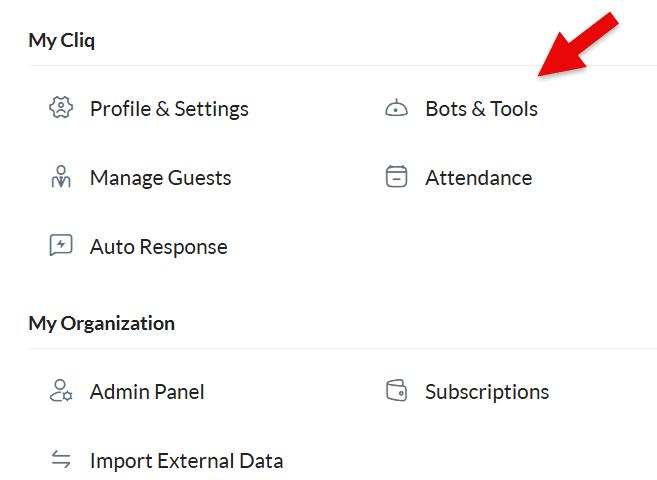
Open the bot builder: click your profile picture (top-right in Zoho Cliq) → under My Cliq choose Bots & Tools.
In Bots & Tools, open the Bots section.
Click Create Bot.
Fill in:
Bot Name (display name, e.g. OpenClaw Agent, max 20 characters) — this is what users see.
Bot Type: choose Custom Bot (a Deluge-backed bot whose handlers forward to the webhook). A pure "Webhook Bot" is not required — we use a Custom Bot with a Deluge handler that invokeUrls our endpoint.
Cliq assigns the unique name itself from the display name; it is not a field you fill in. Read it back from the created bot — that assigned value is the botId you put in the plugin config.
Creating the same bot over the API (or the Zoho MCP server's ZohoCliq_create_bot) uses different field names than this form: name, description, scope (organization | team | personal, required), execution_type (deluge | webhook), and channel_participation. There is no bot_unique_name or bot_type field — both are rejected as extra_key_found, and unique_name comes back in the response.
Set the bot's Functional Handlers:
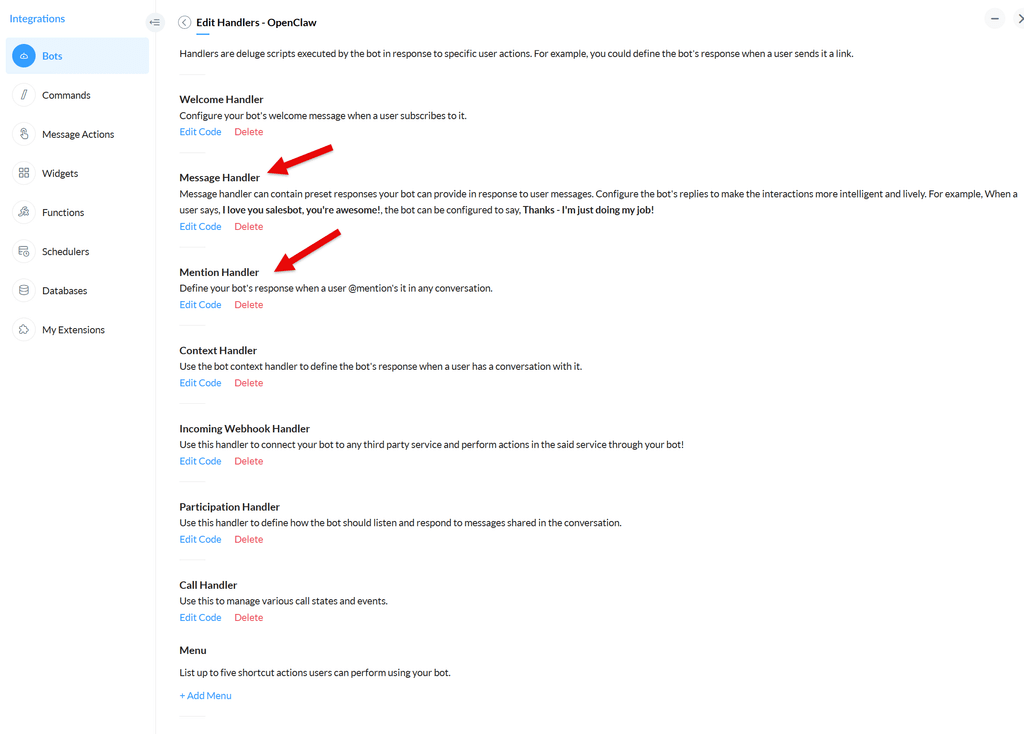
Mention Handler — fired when the bot is @mentioned in a channel.
Message Handler — fired when a user DMs the bot directly.
Publish / Activate the bot (it must be active to receive events).
Users in the organization find the bot in Bots & Tools (or the bot directory) and subscribe to it. The first DM they send is what starts the conversation — until they subscribe and open the bot, they will not see a first-contact message. openclaw setup can inspect the documented bot state and, with explicit confirmation, send one labeled first-contact DM to a directory-resolved user. Subscription membership is only shown when Zoho exposes it to the calling identity; otherwise it is reported as unknown rather than guessed.
Invite the bot into the channel(s) where it should respond to mentions. In a Cliq channel: ⋯ → Bots → add your bot. The bot can always receive DMs without an explicit invite. After it is added, the default group policy still requires an @mention unless groups.<channel>.requireMention is set to false. groupPolicy: "allowlist" admits only listed channels; disabled blocks all group traffic; trusted-organization mode is a deliberate, acknowledged broadening of that admission, not a signed tenant check.
The Bot Unique Name you pick here is the botId config field. The display name is botName (used for @mention stripping in the agent-visible text). Do not substitute Zoho's internal b-... bot ID: that separate ID is required by bot/handler provisioning CRUD, while runtime message paths and botId use the unique name. See the verified provisioning API contract.
2. Configure the Webhook
The plugin registers a single HTTP route at POST /cliq/webhook on your OpenClaw gateway. Zoho Cliq's Deluge bot handler must POST every mention / message event to that URL.
Pick a strong random secret (e.g. openssl rand -hex 32) — this becomes your webhookSecret.
Note the public URL of your OpenClaw gateway, e.g. https://openclaw.example.com. The full webhook URL is:
text
https://<gateway-host>/cliq/webhook
The route is registered with auth: "plugin", so no additional gateway-level bearer token is required; the webhookSecret is verified by the plugin itself via the x-cliq-webhook-secret header.
Make sure the gateway host is reachable from the public internet (Zoho's servers POST to it). See Expose the webhook publicly for deployment options (VPS + reverse proxy, domain-free sslip.io/nip.io + Caddy, Cloudflare Tunnel, existing proxy, dev tunnels, self-hosted tunnel) with secure Caddy and nginx examples.
Verify the public path before wiring up Zoho — this checks DNS, TLS, the reverse proxy, the route, and the shared secret, and finishes with a probe that reaches the plugin without dispatching an agent turn:
When the checked URL matches the configured channels.cliq.publicWebhookUrl, a passing run records channels.cliq.inboundVerifiedAt and a proven failing run records inboundVerificationFailedAt (clearing any stale verification) — so verifying via the CLI counts just like verifying via the wizard. The method/reachability boundary retries transient 502, 503, 504, connection-refused/reset, and timeout outcomes three times with 250 ms then 500 ms backoff. Exhausted transient startup conditions remain inconclusive: human and JSON evidence show the bounded attempt count and delay, the command exits non-zero, and both existing verification timestamps are preserved. The write never happens for a URL that is not this install's, and --no-write keeps the command a pure read-only probe:
openclaw setup runs the same check and will not report inbound Cliq as ready when it fails. When the configured account has botId, client credentials, and the ZohoCliq.Bots.READ scope, the preflight resolves the configured bot unique name through the complete paginated bot listing to Zoho's internal b-… id (or uses an already-internal id without listing), then reads the bot's Message and Mention handler scripts and compares SHA-256 fingerprints of their webhookSecret literals with the resolved config secret, plus each webhookUrl with the URL being tested. The resolution is cached for the diagnostic run. A missing or ambiguous unique-name match, incomplete listing, API failure, missing Bots.READ, no botId, unreadable bot, or hand-written script whose assignments cannot be recognised makes that stage skipped, never passed; raw API responses, handler bodies, OAuth tokens, and secrets are never included in CLI or JSON output. A mismatch is a failing stage that names the handler without printing either secret. The output then says explicitly that the green network/authentication stages do not prove Zoho holds the same secret. Every preflight request identifies itself as openclaw-cliq-preflight/<package-version> (+https://github.com/sprintberlin/openclaw-cliq) so edge/WAF rules can allowlist it deliberately (the version is this package's package.json version); use --user-agent <value> when you need to reproduce the identity your Zoho/Deluge delivery uses. An HTTP 403 is reported as a probable edge/WAF/bot-rule block with that remediation, not as proof that the route or reverse proxy is broken. For a full staged diagnostic of config, OAuth, capabilities, and inbound, see openclaw cliq doctor.
To check only whether the gateway registered the route (no public path, no secret, no agent turn):
bash
openclaw cliq webhook-route # add --port <port> if the gateway is not on 18789
405 plus the plugin's own route signature means the route is registered. Anything else — including a bare 404, which a proxy can generate on its own — is reported as inconclusive rather than as a missing route, and the command exits non-zero so it is safe as a deploy gate. Do not use openclaw plugins inspect cliq --runtime --json for this — it reports "httpRoutes": 0 even when the route is live and serving traffic, because that command loads the plugin without activating it, so the registration step that adds the route never runs for it (upstream: openclaw/openclaw#130773).
In the Cliq Bot's Deluge editor (see step 5 below), set the webhook URL and the secret header on every invokeUrl call.
3. OAuth / API Credentials
The plugin uses two OAuth grant types, because the client_credentials grant CANNOT obtain a usable token for the ZohoCliq.Channels.UPDATE or ZohoCliq.Messages.UPDATE scopes — Zoho issues a token whose response reports the scope, but the API rejects it on use with {"code":"oauthtoken_scope_invalid"}. So:
Bot DMs (/bots/{botId}/message, scope ZohoCliq.Webhooks.CREATE) → client_credentials (the plugin fetches a fresh access token automatically when the cached one expires; no refresh token, no user interaction).
Channel posts (/channelsbyname/{unique_name}/message, scope ZohoCliq.Channels.UPDATE) and message edits (/chats/{chatId}/messages/{messageId}, scope ZohoCliq.Messages.UPDATE) → a user-context refresh token obtained once via the self-client authorization_code flow. Native v3 typing (/api/v3/chats/{chat_id}/activities, scope ZohoCliq.Chats.UPDATE) is consented on the same Self Client refresh-token string. The plugin mints short-lived access tokens from the refresh token via grant_type=refresh_token and caches them until they expire (~1h). Without a refresh token, channel replies and block-streaming live-edit will fail with oauthtoken_scope_invalid — DM-only setups keep working. client_credentials can mint a token that reports Chats.UPDATE, and a live typing call has returned 204 with that grant, but operators must still add it to the Self Client string and regenerate the user-context refresh token used by the runtime profile.
3a. Create the OAuth client
Open the Zoho API Console — use your data center's domain (Data centers). Choose Self Client if you do not already have one for Cliq.
Create a Server-based Application (or Self Client) and note:
Client ID
Client Secret
Your data center's OAuth token endpoint (example uses US .com):
text
https://accounts.zoho.com/oauth/v2/token
The plugin defaults to the EU endpoint (https://accounts.zoho.eu). If your account is on another data center, set oauthBase (and apiBase) in the config (§4) to match — see Data centers.
Copy Client ID and Client Secret — they go into clientId / clientSecret in the plugin config below.
3b. Consent the scopes
Consent once with everything you might need. Zoho scopes are not added retroactively to an existing consent. If you start with the runtime-only string and later want bot inspection or handler provisioning from openclaw setup, you must re-consent the Self Client with the larger scope string and regenerate the refresh token — a second Generate Code round trip with a fresh 10-minute code. Pasting the combined profile below on the first attempt avoids that entirely; consenting a scope you never use costs nothing at runtime.
For a new installation, paste the combined profile from Capability profiles into the Self Client's Generate Code scope field. The individual scopes and what each one unlocks are listed here; both the client_credentials (DM) and refresh-token (channel/edit/delete/card/media/typing) paths need to be covered:
Each scope's grant is shown in parentheses — client_credentials is fetched automatically; refresh token requires the one-time §3c token.
ZohoCliq.Webhooks.CREATE(client_credentials) — Post bot DMs (the /bots/{botId}/message send path).
ZohoCliq.Channels.UPDATE(refresh token) — Post bot messages to channels (the /channelsbyname/{unique_name}/message send path).
ZohoCliq.Channels.CREATE(refresh token) — Post a v3 Message Card to a channel (only when the channelCard family resolves to v3 — the v2 channel card path reuses Channels.UPDATE; opt-in, see §4).
ZohoCliq.Users.READ(client_credentials) — Resolve sender user info.
ZohoCliq.Messages.UPDATE(refresh token) — Edit a sent message in place (block-streaming live-edit of one Cliq response).
ZohoCliq.Chats.UPDATE(refresh token) — Native v3 typing via POST /api/v3/chats/{chat_id}/activities with body {"action":"typing"} (success is empty HTTP 204). A user id is not a chat id. This scope does not unlock GET /api/v2/chats. Cliq renders the indicator as the human refresh-token owner, never as the bot; the API exposes no sender override. The plugin therefore defaults heartbeat.typing to "dm" and suppresses this activity in shared rooms.
ZohoCliq.Messages.READ(refresh token) — Read recent chat messages to resolve an inbound file attachment's file id when a legacy/custom handler forwarded only its name (the plugin fetches the file message via GET /api/v2/chats/{chatId}/messages to recover the downloadable id). The current generated Message Handler forwards the Deluge FILE bytes directly as multipart, but this scope remains useful as a compatibility fallback and for quote/reply parent-text fetches.
ZohoCliq.Messages.DELETE(refresh token) — Delete a sent message via the v3 bulk-delete endpoint (only when the delete family resolves to v3 — the v2 single-message delete reuses Messages.UPDATE; opt-in, see §4).
ZohoCliq.Attachments.READ(refresh token) — Download inbound file / image / voice attachments (GET /api/v2/files/{id}) so they reach the agent.
Image analysis requires a vision-capable model. Plugin channels (like Cliq) route
inbound images through the runtime's media-understanding describe pipeline, which
needs a vision-capable model to produce a text description. If your primary model is
text-only (e.g. mimo-v2.5-pro), configure either (a) a vision-capable model as your
primary, (b) an explicit tools.media.image provider, or (c) a vision-capable fallback
model the runtime can auto-discover. Without this, the agent receives the image file
path but cannot analyze its contents. The turn degrades gracefully (no orphaned
placeholder) — but the image content is not described to the agent.
If you previously consented with only the original three scopes, you must re-consent (generate a fresh self-client token) with ZohoCliq.Channels.UPDATE and ZohoCliq.Messages.UPDATE added — channel replies will be rejected with invalid_scope / 401 until you do. Tokens minted before ZohoCliq.Chats.UPDATE was required fail native v3 typing with oauthtoken_scope_invalid until you re-consent the Self Client including that scope and regenerate the refresh token. ZohoCliq.Messages.DELETE and ZohoCliq.Channels.CREATE are only needed when you opt the corresponding family into v3 (delete / channelCard — see §4); the v2 paths reuse Messages.UPDATE / Channels.UPDATE respectively, so if you keep those families on the "v2" default you can skip them. The v3 bot-DM endpoint (the dmPost default) uses the sameZohoCliq.Webhooks.CREATE scope as v2 DMs (client_credentials, no extra scope) — though some orgs may additionally require ZohoCliq.BotMessages.CREATE; if yours does, fall back with apiVersion: { dmPost: "v2" }. Reactions (ZohoCliq.messageactions.CREATE) are optional — skip the scope if you don't need the react action, and the plugin will simply not advertise reaction support. ZohoCliq.Messages.READ is only needed for inbound image / file attachments (resolving a bot-handler file name to a downloadable id) and the quote/reply parent-text fetch — skip it for a text-only bot and those features degrade gracefully. Likewise ZohoCliq.Attachments.READ is only needed for inbound media (downloading the resolved images / files / voice a user sends) — skip it for a text-only bot and the plugin degrades to "no media" for those messages.
Capability profiles
The plugin defines two capability profiles — each a named set of OAuth scopes
with a specific grant type. The capability matrix in src/capabilities.ts is the
single source of truth; openclaw doctor validates capabilities at setup time.
Combined profile (recommended) — runtime + setup in a single consent (14
scopes). This is the string to use for a new installation: one paste, one code
exchange, and both normal messaging and bot/handler provisioning from
openclaw setup work without a second consent. Copy it into the Zoho API
Console's Generate Code scope field:
The two tables below break that string into its runtime and setup halves.
Runtime-only profile (minimal alternative) — the 11 scopes required for
normal DM/channel messaging and optional messaging features, with no bot
inspection or provisioning. Use this only if you are certain you will never
provision bots or handlers from openclaw setup; adding those scopes later
means re-consenting and regenerating the refresh token:
Setup / maintenance profile — scopes required for bot inspection and handler
provisioning from openclaw setup. These are not needed for normal messaging.
Inspect-only consent (ZohoCliq.Bots.READ) can look at existing bots but cannot
create or change anything; provisioning consent additionally includes the create and
update scopes:
Inspect vs. create is a real difference. A token consented with only
Bots.READ + Bots.UPDATE is issued happily (the token response even reports
both scopes) but POST /api/v3/bots fails with
{"code":"oauthtoken_scope_invalid"} — the error suggests a bad token when the
real cause is the missing ZohoCliq.Bots.CREATE consent. Bot creation is
destructive to probe, so this capability is reported from the granted scope set,
never verified by actually creating a bot.
The bot/handler endpoint, method, and body details verified live — including the
internal b-... bot ID requirement — are recorded in the
verified provisioning API contract.
3c. Obtain the user-context refresh token (required for channel posts + edits)
Channel posts need a user-context token, which client_credentials cannot provide
(Zoho issues a client_credentials token that claims the ZohoCliq.Channels.UPDATE
scope, but the channel API rejects it with oauthtoken_scope_invalid). You get a
user-context token from a refresh token, obtained once via the Self Client's
authorization-code flow. This is a two-step process — a short-lived code that you
exchange for a permanent refresh token.
The default already skips this for bot DM posts. The dmPost family
defaults to v3 (see §4): bot DM posts route
through POST /api/v3/bots/{botId}/messages with the ZohoCliq.Webhooks.CREATE
scope obtainable via client_credentials, so a refresh token is not
required for DMs. The v3 DM endpoint posts as the bot (sender identity
preserved — the bot unique name is in the URL path) and sends the recipient
key as userids + sync_message: true, so the response carries the sent
message_id + chat_id (under message_details.<userId>) — what the
thinking placeholder and DM live-edit-in-place need to edit the reply in
place. Some orgs may additionally require ZohoCliq.BotMessages.CREATE for
the v3 bot endpoint; if yours rejects the v3 DM post, restore the v2 path with
apiVersion: { dmPost: "v2" }.
Channel text posts still need the refresh token by default
(channelPost defaults to v2 → Channels.UPDATE). Opting
apiVersion: { channelPost: "v3" } routes channel text posts through
POST /api/v3/channelsbyname/{name}/messages (also Webhooks.CREATE, so no
refresh token) — but v3 channel posts return no message id, so live-edit
for channel posts degrades to block-streaming (no win over v2). The message
delete family stays v2 by default (Messages.UPDATE); opt
{ delete: "v3" } for the v3 bulk-delete endpoint
DELETE /api/v3/chats/{chatId}/messagess?message_ids=<id> — that scope
(Messages.DELETE) still needs a user-context refresh token, so the refresh
token is still required for deletes even in v3. Channel card/button posts (in
channels), media posts, and message edits still require the refresh token
(channel card posts route through the v3 Message Card endpoint
POST /api/v3/channels/{name}/message with the ZohoCliq.Channels.CREATE
scope — a user-context scope, same constraint as Channels.UPDATE; media
posts stay on v2 indefinitely — v3 has no byte-upload surface, only a
public-HTTPS-image Message-Card slide that posts as the user, not the bot;
message edits stay on v2 indefinitely — v3 Messages has no single-message
edit endpoint). DM card/button posts in v3 route through the v3 "Send a
bot message" endpoint POST /api/v3/bots/{botId}/messages with a top-level
card field — the same Webhooks.CREATE scope as DM text posts
(client_credentials, no refresh token needed), posting as the bot and
addressing the recipient via userids (no chat-id resolution needed). If you
only need DM text + DM cards, the default already skips this step entirely.
Skip Messages.DELETE from the scope if you don't use deletes; likewise skip
Channels.CREATE if you don't use v3 channel cards. Verify your Zoho org
accepts the v3 endpoints before relying on it.
Why only once: only the code is short-lived (10 minutes, single-use). The
refresh token you get from it does not expire — it survives gateway restarts and any
amount of downtime. You do this once per Cliq org and never again (unless you revoke it).
Scope: paste the combined 14-scope profile below (comma-separated, no spaces). Zoho scopes are not added retroactively: choosing the runtime-only alternative now and adding setup/provisioning later requires a new consent and a regenerated refresh token.
text
Time Duration: 10 minutes. Scope Description: anything (e.g. openclaw). Pick your portal/org if prompted.
Click Create and copy the code — it looks like 1000.<hex>.<hex>.
Step 2 — exchange the code for a refresh token (do this within the 10 minutes):
The Self Client console gives you a code, not the token. Exchange it against your data
center's token endpoint (the example uses US .com — see Data centers;
no redirect_uri is needed for the self-client flow):
bash
curl -X POST "https://accounts.zoho.com/oauth/v2/token" \
  -d "grant_type=authorization_code" \
  -d "client_id=<clientId>" \
  -d "client_secret=<clientSecret>" \
  -d "code=<code from step 1>"
The response is JSON:
json
{
  "access_token": "1000....",     // short-lived (~1h) — ignore it
  "refresh_token": "1000....",    // PERMANENT — this is the one you keep
  "scope": "ZohoCliq.Webhooks.CREATE ZohoCliq.Channels.UPDATE ...",
  "expires_in": 3600
}
Copy the refresh_token value.
Step 3 — store it: put the refresh_token in the plugin config as refreshToken (see §4).
From then on the plugin mints its own short-lived access tokens from it automatically
(grant_type=refresh_token), forever.
Troubleshooting:
invalid_code on exchange → the code expired (>10 min) or was already used once. Generate a fresh one.
Native typing still oauthtoken_scope_invalid → the refreshToken was minted without ZohoCliq.Chats.UPDATE. Re-consent the Self Client with the full scope list and regenerate the refresh token.
Channel replies still oauthtoken_scope_invalid → the refreshToken is missing from config, or was minted without ZohoCliq.Channels.UPDATE. Re-run 3c with the full scope list.
channel_not_exists on a real channel → the bot is not a participant of that channel (invite it: channel ⋯ → Bots), or you used the channel's display name instead of its unique name (the technical name — e.g. a channel shown as "Finance" may have the unique name invest).
If you skip 3c entirely, the plugin still works for bot DMs (the client_credentials
path); channel @mention replies, live-edit message edits, and native v3 typing require the
user-context refresh token.
4. OpenClaw Configuration
Add the cliq channel to your openclaw.json (or via openclaw setup / the setup wizard's applyAccountConfig step). The required fields are clientId, clientSecret, botId, and webhookSecret; botName and allowFrom are recommended.
jsonc
{
  "channels": {
    "cliq": {
      "enabled": true,               // optional — omit or true keeps the channel running
      "clientId": "<OAuth client id from step 3a>",
      "clientSecret": "<OAuth client secret from step 3a>",
      "botId": "openclaw_agent",      // Bot Unique Name from step 1
      "botName": "OpenClaw Agent",    // Bot display name from step 1
      "webhookSecret": "<secret from step 2>",
      "refreshToken": "<refresh token from step 3c — required for channel posts / edits>",
       "allowFrom": ["<zoho user id of each allowed DM sender>"],
       // See the multi-user privacy warning below: session.dmScope is global
       // and must be per-channel-peer for any bot several people can DM.
       "dmPolicy": "allowlist",        // "open" | "allowlist" | "pairing" | "disabled"
       "groupPolicy": "disabled",      // "open" | "allowlist" | "disabled"
       "groups": { "dev-team": {} },
       "trustedOrganization": {
         "acknowledged": true,
         "label": "Pay-Jet"
       },
      "streaming": { "mode": "partial" }, // default; set "off" for a single final reply
      "thinking": {
        "mode": "placeholder",
        "animate": "dots"
      }
    }
  },
  "agents": {
    "defaults": {
      "blockStreamingDefault": "on" // fleet/global Core default; Cliq preview-on also asks per turn
    }
  },
  "session": {
    // REQUIRED for any bot more than one person can DM — see the warning below.
    "dmScope": "per-channel-peer"
  }
}
⚠️ Multi-user privacy: dmPolicy and allowFrom do NOT isolate conversations.
Those two settings control admission — who may contact the bot. They say nothing about
isolation — whether those people share one conversation. Isolation is controlled by the
separate, global session.dmScope.
main is the runtime default whenever the session block is absent, so this affects fresh
installations, not only upgrades from an older config. With dmScope: "main" every DM collapses
into agent:<agentId>:main, across senders and across channels. Two things follow:
Context leakage — one Cliq user's conversation history can appear in another user's turn.
Cross-channel misrouting — the shared session's latest delivery route may point at a
different channel, so a message can be received and processed while the reply is never
delivered where it arrived (the gateway logs visible channel turn dispatched with no queued reply payloads).
Set the scope for any bot several people can reach:
Sessions are then isolated per channel and per sender (conceptually
agent:main:cliq:direct:<cliq-user-id>). For deployments with several configured Cliq
accounts, use the stricter per-account-channel-peer, which additionally isolates the same
sender across accounts. Restart the gateway after changing it — it is read at startup.
openclaw cliq doctor warns when a multi-user Cliq bot still resolves to main, and
openclaw security audit reports it as a critical finding
(channels.cliq.session_scope.shared). Setup asks before changing it, because the value is
global to every channel and must not be overwritten silently.
The default account is configured directly under channels.cliq, as shown above. Do not put it under accounts.default: the plugin treats the reserved id default as the top-level account. For multiple Cliq accounts, keep the default credentials at the top level and add only named secondary accounts under channels.cliq.accounts.<accountId>.
Inbound webhook traffic is resolved against the root account only. The gateway registers a single POST /cliq/webhook route and authenticates plus dispatches it with resolveCliqConfig(cfg, null) — there is no header, path, or payload multiplexing into channels.cliq.accounts.<id>. Named accounts are currently outbound/diagnostics-only (sendText({ accountId }), openclaw cliq doctor --account <id>). Running multiple conversational bots requires separate gateway deployments (one per bot): each bot needs its own botId, webhookSecret, public URL, and handlers. See Running multiple agents. A second bot configured only as a named account on one gateway will fail admission (wrong secret / bot identity) or land in the default account's agent.
The three sensitive fields accept three interchangeable representations, at the channel root and inside channels.cliq.accounts.<id>. All three are accepted identically on every supported OpenClaw version (2026.8.2 and later) — there is no version-gated fallback:
A SecretRef requires all three of source, provider, and id; source is one of env, file, or exec. provider must match ^[a-z][a-z0-9_-]{0,63}$ and, for env, id must match ^[A-Z][A-Z0-9_]{0,127}$. Anything else is rejected by config validation rather than silently accepted.
At runtime the plugin resolves plaintext, $NAME / ${NAME} env shorthands, and env-backed refs synchronously, matching the bundled Telegram channel. Shorthand strings follow the same secrets.defaults.env and provider-allowlist rules as structured SecretRefs; a missing or empty environment value is reported as unresolved rather than using the placeholder text as the credential. file and exec refs are reported by openclaw cliq doctor as configured-but-unresolved rather than being silently treated as absent.
To migrate literal secrets out of openclaw.json:
bash
openclaw secrets audit          # lists every plaintext Cliq secret, root and per-account, by path
openclaw secrets configure      # map each one to a provider-backed SecretRef
openclaw secrets apply          # rewrite config in place; values are never printed
openclaw cliq doctor reports each secret as resolved, unresolved, referencing an unavailable provider, plaintext, or absent — identified by source:provider:id only, never by value.
The plugin defaults to the EU data center. For another region, add both oauthBase and apiBase at the same account level; see Data centers.
For multiple gateway deployments, see Running multiple agents before reusing credentials: the OAuth app can be shared, but each agent requires its own bot identity, webhook secret, public URL, and handlers.
Every field except the required ones has a sensible default; groups / thinking / pairing are nested objects (see their descriptions).
enabled(optional) — Channel-level on/off switch, matching the shape of bundled channels (channels.telegram.enabled). Omitted or true keeps the channel running; false keeps the credentials in place but stops the account from starting. Named accounts under channels.cliq.accounts.<id> can override this with their own enabled. This is not the same key as plugins.entries.cliq.enabled: that OpenClaw-owned switch unloads the plugin entirely, so a channels.cliq.enabled: true cannot re-enable a plugin that was turned off there. The setup wizard writes channels.cliq.enabled: true.
clientId(required) — OAuth client id from the Zoho API Console.
botId(required) — Bot Unique Name (the path segment in the bot message API), not Zoho's internal b-... bot ID. Bot and handler provisioning CRUD requires that separate internal ID after resolving the unique name; see the verified provisioning API contract.
botName(recommended) — Bot display name. Used to strip the @botName mention from the text the agent sees.
webhookSecret(required for inbound delivery) — High-entropy shared secret the Deluge handler sends in the x-cliq-webhook-secret header. If unset or unresolved, /cliq/webhook fails closed with 503 and never dispatches an agent turn. A missing or wrong request header returns 401.
publicWebhookUrl(optional) — The public HTTPS URL Zoho posts to, e.g. https://cliq.example.com/cliq/webhook. Recorded by openclaw setup so it can verify inbound delivery, and used to identify whether openclaw cliq webhook-preflight <url> is checking this install (and may record its result) or an unrelated endpoint (which must stay read-only). It is also reused by the public-webhook stage of openclaw cliq doctor. When the field is missing, the doctor can name the URL both Zoho handlers already agree on; openclaw cliq doctor --adopt-handler-url stores that verified URL and inboundVerifiedAt after a passing preflight. It does not change routing (the gateway always serves /cliq/webhook); it only tells the tooling which public URL belongs to this install. See Expose the webhook publicly.
inboundVerifiedAt(written by setup or the preflight CLI) — ISO timestamp of the last successful public webhook verification. Written by openclaw setup when the preflight passes, and also by openclaw cliq webhook-preflight <url> when the checked URL is the configured publicWebhookUrl (pass --no-write for a read-only probe); cleared when a later check proves a permanent failure, but preserved when bounded startup/readiness retries end inconclusively. Not read at runtime.
inboundVerificationFailedAt(written by setup or the preflight CLI) — ISO timestamp of the last proven failed public webhook verification. Set when a check against the configured publicWebhookUrl proves a permanent failure and cleared by a later passing one, so status output can distinguish "never checked" from "last check failed" instead of folding both into "NOT verified". Transient/inconclusive runs preserve this and inboundVerifiedAt. Not read at runtime.
inboundCatchup(optional, default off) — A bounded safety net for a direct-message webhook delivery that was missed even though the message exists in Cliq. With { "enabled": true, "limit": 50 }, the next admitted DM fetches at most 50 recent records from GET /api/v2/chats/{chatId}/messages, first verifies the current live message as a same-sender/same-text anchor, then dispatches only native-id records strictly between the persisted opaque per-conversation cursor and that anchor, oldest first. First enablement only stores the current anchor — it never imports an unbounded existing chat backlog. A missing cursor, absent anchor, failed read, missing refresh token, group/channel turn, malformed history record, self/bot record, or existing dedupe claim yields no recovery and never breaks the live inbound. The cursor is a mode-600 local state record keyed by SHA-256 of account/chat ids; it contains no message content. Requires a user-context refreshToken with ZohoCliq.Messages.READ; Doctor reports enabled catch-up as unavailable when that credential is absent. Catch-up is event-triggered only — it neither schedules polling nor enables the Cliq MCP/agent message-read action. See Chat-history recovery.
refreshToken(recommended) — User-context OAuth refresh token (sensitive). Obtained once via the self-client authorization_code flow (§3c). Required for channel @mention replies, live-edit message edits, and native v3 typing — without it, those paths fail with oauthtoken_scope_invalid (the runtime profile uses refresh-token consent for ZohoCliq.Channels.UPDATE, ZohoCliq.Messages.UPDATE, and ZohoCliq.Chats.UPDATE). DM-only setups can leave it unset.
heartbeat.typing(optional, default "dm") — Controls native v3 typing activities: "off" disables them, "dm" permits only remembered or explicitly addressed direct chats, and "all" also permits channels/groups. Cliq attributes every activity to the human who owns refreshToken; there is no supported bot/sender override, and bot_unique_name is rejected. Use "all" only when that human attribution is deliberate. Ambiguous raw CT_… targets fail closed under "dm"; an inbound chat record or explicit cliq:user:… target must prove that the chat is direct. This setting does not affect visible bot-owned thinking/progress messages.
ackPolicy(optional) — When the webhook acknowledges Cliq relative to the inbound dispatch. "after_dispatch" (default) awaits the full dispatch before sending HTTP 200 — a crash mid-dispatch means Cliq never sees the 200 and redelivers (no lost message), and it works on every supported OpenClaw version. "immediate" acknowledges first (faster, but a crash after the ack can lose the message). Deluge timeout gotcha: Zoho's invokeUrl in the bot Message handler has a ~40 s hard timeout. With "after_dispatch", a slow turn (image analysis, cold model) can trip Deluge's "The task has been terminated since the API call is taking too long to respond" even though the reply is delivered out-of-band; Deluge may then redeliver while the original turn is still running, and #123 prevents that redelivery from becoming a spurious "Couldn't process that message" placeholder. "immediate" is the escape hatch when that timeout is unavoidable: on the supported runtime (>= 2026.8.2) this plugin wraps the continuation in the SDK's runDetachedWebhookWorkbefore writing the 200 (#122); without that wrapper the healthy gateway refuses the post-ack turn with GatewayDrainingError and the user sees "Couldn't process that message". Prefer "after_dispatch" when turns stay below the Deluge timeout; use "immediate" for slower turns only when you accept the crash-after-ack loss risk. Pairs naturally with thinking.mode: "placeholder" (the placeholder posts immediately while the agent works).
allowFrom(optional) — Array of Zoho Cliq user ids allowed to DM the bot (only effective when dmPolicy is allowlist or pairing). This is an admission control, not session isolation; multiple allowed senders still share context unless global session.dmScope is per-channel-peer (or per-account-channel-peer).
dmPolicy(optional) — DM admission policy, not conversation isolation (see the multi-user privacy warning above). Default is allowlist (deny by default). pairing starts the OpenClaw pairing approval flow for unknown senders — by default the sender gets a reply with a pairing code and the bot owner runs openclaw pairing approve cliq <code> on the CLI; set pairing.notifyOwnerTarget (see the pairing row below) to instead post an Approve/Deny card to the owner so approval happens inline in Cliq. Accepted values: open, allowlist, pairing, disabled (schema-validated — unknown field names like dmSecurity are rejected).
groupPolicy(optional) — Group/channel admission policy. Fresh generic setup defaults to disabled; open lets the bot respond in any channel where it is @mentioned, allowlist restricts it to channel unique names listed under groups, and disabled ignores all group messages. Existing configurations without groupPolicy retain the legacy open behavior and are never rewritten during upgrades.
groups(optional) — Per-channel config keyed by the Cliq channel unique name. Setup resolves entered channel names through the existing directory adapter. Each entry supports requireMention (boolean — false lets the bot respond in that channel without an explicit @mention), ingest (boolean), tools ({ allow, alsoAllow, deny } tool policy for that channel), and toolsBySender (per-sender tool policy overrides keyed by channel:cliq:<senderId>, id:<senderId>, name:<display>, e164:<phone>, username:<handle>, or *). A * entry applies to any channel not listed explicitly.
trustedOrganization(optional, explicit acknowledgement) — Set by setup only after the operator confirms organization-wide exposure. This metadata is never inferred from allowFrom: ["*"] or dmPolicy: "open"; existing open configurations remain unchanged. acknowledged: true makes the security audit classify the deliberate wildcard/open policy as informational, but does not enforce organization membership. Cliq webhook payloads may include user.organization_id, yet Deluge forwards it as ordinary JSON and the directory API provides no independent tenant proof. The actual boundary is the constant-time verified x-cliq-webhook-secret plus the installed bot-handler context. The wizard displays the effective DM/group access and tool-policy caveat before recording acknowledgement.
What you see. New installs post an animated placeholder by default (thinking.mode: "placeholder", thinking.animate: "dots" — cycles 💭 . → 💭 .. → 💭 ... while the agent works). That bubble is the same message the reply later edits in place — not a second progress surface. A "missing" reply is often that bubble still showing 💭 … because the Cliq client has not redrawn the edit.
Turn it off. Set thinking.mode: "off" so no placeholder is posted. To also get a fresh final message instead of an in-place replace of that bubble, set streaming.mode: "off".
Modes.thinking.mode selects the acknowledgement style: "placeholder" (default — post a lightweight text placeholder, default 💭 …, configurable via thinking.text, then edit it in place into the final reply — exactly one message, no duplicate), "card" (post a v3 Message Card status indicator — a modern-inline card — instead of plain text, and transition its title through explicit phases as the turn runs: it is first posted with the "thinking" phase title thinking.thinkingText, default 💭 thinking…, then edited in place to the "generating" phase title thinking.text, default Generating…, right before the agent turn dispatches, and finally edited into the reply text when the reply arrives), or "off" (no extra API call per turn). On apiVersion: "v3" the card is a real card posted via the v3 Message Card endpoints (DM via POST /api/v3/bots/{botId}/messages with scope Webhooks.CREATE, channel via POST /api/v3/channels/{name}/message with scope Channels.CREATE); on v2 it degrades to the plain-text placeholder since v2 has no buttonless card. Native v3 typing (POST /api/v3/chats/{chat_id}/activities) is separate and posts as the refresh-token owner, not as the bot; this bot-owned placeholder remains the safe visible progress surface for shared rooms.
Animation.thinking.animate cycles the placeholder through text frames on an interval while the agent turn has not produced a real draft update: "dots" (default — 💭 . → 💭 .. → 💭 ...), "spinner" (braille-spinner frames prefixed with a fixed thinking… label), "custom" (cycles thinking.animateFrames, a string array — needs ≥2 non-empty entries or it degrades to the static placeholder), or "off" (static placeholder). The interval is thinking.animateIntervalMs (default 1200 ms, hard-floored to 800 ms to protect the Cliq edit rate limit) and the total animation duration is capped (default 60 s — past the cap the animation stops and holds the last frame so a long turn does not hammer the edit endpoint). The animation reuses the existing editMessage path (Messages.UPDATE, same refreshToken precondition as the placeholder itself); a failed frame edit stops the animation but never breaks the turn. With streaming.mode: "partial", "block", or "progress", animation covers the otherwise silent tool/reasoning phase, then stops permanently at the first substantive preview/progress/final update. The stop drains an in-flight frame PUT before that real update is applied, so a late frame cannot overwrite the growing draft. No new OAuth scope.
Confirmation gate (card-mode only): set thinking.confirm to gate sensitive inbound actions behind an explicit Confirm / Cancel button card instead of dispatching immediately. "off" (default) disables gating; "sensitive" gates only when the cleaned message matches a thinking.confirmKeywords entry (case-insensitive word-boundary match; defaults to a conservative destructive-verb list — delete, drop, reset, wipe, purge, …); "always" gates every turn (apart from abort intents and Confirm-button re-dispatches). When gated, a prompt-theme Message Card titled thinking.confirmText (default ⚠️ Confirm action?) with thinking.confirmLabel / thinking.cancelLabel buttons (defaults Confirm / Cancel) is posted and the agent turn is held until the user taps a button. Confirm re-posts the original message (prefixed with a sentinel) so the next webhook call dispatches the agent with the gate skipped (no re-prompt loop); Cancel posts a sentinel that short-circuits the turn with thinking.cancelledText (default 🚫 Cancelled.) and no agent dispatch. The button clicks arrive as ordinary inbound messages via the bot's Message handler (invoke.bot) — no Cliq Context handler is required. Messages longer than 1500 chars bypass the gate (cannot be safely encoded in the confirm button payload). The gate is a UX guardrail, not a security boundary — the agent's own tool / permission policy still applies to the confirmed action. No new OAuth scope (reuses the card-path scopes).
Requirements. Any acknowledgement mode is a no-op when no refreshToken is configured (editing the placeholder into the reply needs the user-context token). thinking.failureText (optional) overrides what the placeholder/card becomes when the agent turn ends with no reply (the turn threw, or the model produced no output): when set, the placeholder is edited into that text (e.g. ⚠️ No reply generated.); when unset, the untouched placeholder is deleted so no stray indicator lingers.
streaming(optional) — Block-streaming live-edit of one Cliq response. This is not Telegram-style token streaming.
What you see on a default install.streaming.mode defaults to "partial" when unset. Existing legacy streaming.preview: "on" also resolves to "partial"; preview: "off" resolves to "off". The thinking placeholder, when present, is the same message the final reply edits in place. A 2026-08-29 production DM (Mara, defaults, refreshToken present — issue #195) posted a 4-character placeholder (textLen=4), sat through ~30s of model + tool work with no intermediate PUTs, then applied one final edit (textLen=117, HTTP 204). #175 and #185 never documented a live Cliq DM round-trip; that Mara miss is the first production evidence.
Two switches, not one. OpenClaw block streaming, Cliq one-message live-edit, and thinking placeholder animation are different layers:
Switch
Layer
What it does
agents.defaults.blockStreamingDefault
OpenClaw block streaming
Fleet/global Core default. Affects channels or turns that do not set a per-turn override.
channels.cliq.streaming.mode
Cliq one-message live-edit
Selects "off", "partial", "block", or "progress". The current default is "partial"; any non-"off" mode asks Core for block/partial delivery on that Cliq turn even if the global default is off. "progress" is an explicit opt-in: Core tool/item/plan events update one compositor-owned draft, and onPartialReply is not used for that mode.
thinking.animate
thinking placeholder animation
Cycles placeholder frames during the silent phase; streaming/progress takes ownership at its first substantive draft update.
Setting only agents.defaults.blockStreamingDefault: "on" is not enough to make a terminal-held model grow, and no config switch can invent text the provider/Core holds until the end of the turn.
Working streaming configuration. Verified live on Mara and Pay-Jet Franzi (plugin 7ab02f9 / 0.1.10, OpenClaw 2026.8.1-beta.3, refreshToken present — issue #205):
What each mode actually means. The four modes are different lanes, not four intensities of the same thing:
Mode
What drives the visible draft
What it is not
"progress"
Core work events (tool / item / plan / approval / command / patch / narration) update one draft while the turn runs. It never depends on answer snapshots, so a model that emits no intermediate text still shows visible work.
Not an answer preview — the answer arrives only as the final message.
"partial"
Core answer previews (onPartialReply) update the draft, and only when the model/runtime actually emits them.
Not a work log — a terminal-held model shows nothing until the final.
"block"
Core block semantics: each flushed reply block is folded into the same draft.
Not token streaming.
"off"
Nothing intermediate; the final reply is delivered normally.
Not a fallback for the modes above — it disables live-edit entirely.
Progress-mode configuration. To show Core work events on a model that holds its answer text until the end:
Modes and legacy compatibility."partial" preserves the current answer-preview behavior; "block" selects Core's block preview shape; "progress" opts into the Core progress-draft compositor (createChannelProgressDraftCompositor) and its configuration surface (streaming.progress.toolProgress, commentary, narration, commandText, label / labels, maxLines, maxLineChars); "off" disables live-edit. In "progress" mode, Core onToolStart / onItemEvent / onPlanUpdate / onApprovalEvent / onCommandOutput / onPatchSummary / onNarrationUpdate callbacks drive one draft, and answer snapshots cannot overwrite that draft before final delivery. Reasoning progress is forwarded only when the existing OpenClaw reasoningDefault / session reasoningLevel is "stream". The plugin reads these settings with OpenClaw's shared streaming helpers instead of maintaining a second parser or defaults. Legacy streaming.preview: "on" | "off" remains loadable and maps to "partial" | "off"; an explicit streaming.mode wins if both keys are present. Run openclaw doctor --fix to rewrite legacy root and per-account config safely.
What progress renders. Core owns the status headline, plan checklist, sanitized rolling lines, line identity/order, and maxLines / maxLineChars truncation. Cliq converts that composed Markdown once with markdownToCliq, caps the visible draft at 5000 characters, and reuses a text thinking placeholder when present; otherwise it creates one editable text message after Core's start gate. Updates are throttled and coalesced by streaming.minEditIntervalMs, while Core's flush requests bypass the wait. A fitting final answer replaces the same message even when it is shorter; a long final uses that message for the first chunk and normal messages for overflow. If final replacement fails, the complete final is sent normally and stale-draft deletion is best-effort because Zoho may reject deletion of bot messages. Card-only replies retire an editable text draft with the existing placeholder fallback; no-reply errors replace it with failure text, and benign skips retire it to a minimal marker. Progress drafts stay off for v2 DMs, v3 channel posts, and thinking.mode: "card" because those surfaces cannot be converted into editable text in place. This requires a refreshToken with ZohoCliq.Messages.UPDATE.
Guarantee. Same message plus in-place final edit when message ids and ZohoCliq.Messages.UPDATE are available. Progressive intermediate growth only when the selected model/runtime emits intermediate text — that caveat is about answer text, so it applies to "partial" and "block". In "progress" mode the intermediate content is Core work events, so visible movement does not depend on the model emitting answer snapshots.
Live model matrix (same host Mara, same plugin, same OpenClaw, same 80-sentence prompt, both switches on, thinking=medium):
Model
Shape
sprintcx/tier-1 + thinking=medium
send textLen=4 → (46 s, no intermediate PUT) → one edit textLen=4097. This path can stamp openclawDelivery.textPhaseRequiresTerminal and return before emitAssistantStreamData (openclaw/openclaw#132615).
OpenAI-completions + thinking is therefore not a universal snapshot block. Plugin unit tests that call onPartialReply themselves do not prove the runtime emits it. Coalesced block deliver() calls can still edit the same message when Core flushes a block.
Snapshots are not always emitted, and the first one can be tiny. A 2026-08-30 Mara DM (issue #203) showed two identical prompts taking different shapes on the same host and model: one jumped straight from the placeholder to the final answer, the other emitted snapshots starting at textLen=1. Snapshots that carry no more content than the placeholder text itself are ignored, so a 1-character draft never replaces the acknowledgement bubble.
HTTP 204 is API acceptance only. Zoho can accept the final PUT /api/v2/chats/{chatId}/messages/{messageId} while the Cliq desktop/app still shows ⏳ … until the chat is reopened. Native v3 typing is different: a second-account observation proved that accepted activity is visible but attributed to the human refresh-token owner. That is why heartbeat.typing defaults to DMs and shared-room progress uses bot-owned editable messages. Live-edit still needs the redraw caveat.
Opt out. Set streaming.mode: "off" for a single final reply instead of an in-place replace. Combine with thinking.mode: "off" if you do not want the thinking bubble at all. The legacy streaming.preview: "off" remains accepted until migrated by doctor.
Mechanics. The thinking animator (thinking.animate) may update the shared placeholder while preview/progress is still silent. Before the first substantive draft update, the inbound path stops the timer and drains any frame edit already in flight; every later edit belongs only to live preview/progress, so animation cannot clobber generated text. Live-edit needs refreshToken (ZohoCliq.Messages.UPDATE); without it, previews degrade to one normal final response and openclaw cliq doctor says so. Edits are throttled and coalesced (streaming.minEditIntervalMs, default 1000) so unchanged or older content is never sent, and a 429 backs off before retrying the latest preview. Edit failures fall back to one normal final response without failing the turn. Message edit stays on the v2 PUT /api/v2/chats/{chatId}/messages/{messageId} path (ZohoCliq.Messages.UPDATE); v3 has no single-message edit endpoint.
welcome(optional) — Welcome message on subscribe. When the Cliq bot Welcome Handler forwards a subscribe event to the webhook (see §5a) and welcome.enabled === true, the bot posts a configurable greeting DM to the subscriber. welcome.text is used for first-time subscribers and welcome.textRejoin for users who unsubscribed and came back; both default to a friendly greeting and support {{firstName}} / {{lastName}} / {{name}} / {{id}} / {{email}} placeholders resolved from the forwarded user object. The DM admission policy (dmPolicy / allowFrom) is honored — a denied sender is never greeted, and under the pairing policy an un-paired subscriber is skipped (the pairing flow owns their first contact). Default enabled: false (opt-in, so no setup gets a surprise greeting). A redelivered subscribe event is deduped so the user is never greeted twice.
pairing(optional) — Form-driven pairing approval (only effective when dmPolicy is pairing). By default an unknown sender's pairing code must be approved on the CLI (openclaw pairing approve cliq <code>). Set pairing.notifyOwnerTarget to a Cliq route target — cliq:user:<zohoUserId> / user:<zohoUserId> / cliq:channel:<uniqueName> / channel:<uniqueName> (a bare string is treated as a DM user id) — and the pairing flow additionally posts an approval prompt card there (a prompt-theme Message Card with Approve/Deny invoke.bot buttons) carrying the sender id + pairing code. The configured owner taps Approve to admit the sender (the plugin records the sender in its persistent approval store and, where available, also writes through to OpenClaw's SDK allow-from store) or Deny to reply deniedOwnerText (the pending request is left in place; the sender is re-challenged idempotently if they message again). Only the exact DM identity configured by pairing.notifyOwnerTarget may approve or deny; comparison is case-insensitive, and any other sender — including the person requesting access with their own valid code — is rejected without revealing whether the code was valid. Because a channel target identifies a room rather than a person, channel targets cannot securely prove which member clicked and their button actions are rejected; configure a user/DM target for inline approval. Button approval works on every supported OpenClaw version through the plugin-owned store. The CLI step (openclaw pairing approve cliq <code>) works on every supported version and remains available alongside the card. Button approvals are persisted per account in <state-dir>/cliq/pairing-store.json (sender id, approving owner, timestamp — never the pairing code); removing the account clears its records, and pairing codes are single-use and expire after one hour. Requires botId (the v3 invoke.bot button renderer drops buttons without one); when absent or notifyOwnerTarget is unset, the card is skipped and only the CLI path is used. The button click arrives as an ordinary inbound message and is short-circuited before the mention / admission gates (so the owner need not be on the allowlist to approve). Optional overrides: approveLabel / denyLabel (button labels, default Approve / Deny), approvalTitle (card title, default 🔐 Pairing request), approvedOwnerText (owner reply on approve, default ✅ Approved.), deniedOwnerText (owner reply on deny, default 🚫 Denied.). No new OAuth scope — the approval card reuses the same card-path scopes (Webhooks.CREATE for DM cards via client_credentials; Channels.UPDATE on v2 / Channels.CREATE on v3 for channel cards) the existing message(action=send, buttons=…) path uses.
oauthBase(optional) — OAuth base URL for your Zoho data center. Defaults to the EU endpoint https://accounts.zoho.eu. Set it (together with apiBase) when your account is not on EU — see Data centers.
apiBase(optional) — Cliq REST API base URL for your Zoho data center. Defaults to the EU endpoint https://cliq.zoho.eu. Set it (together with oauthBase) when your account is not on EU.
apiVersion(optional) — REST API generation for the channel text post, bot DM post, message delete, and channel card/button post families. Accepts EITHER a string global override OR a per-family object:
a string"v2" forces ALL migratable families to the verified-live v2 endpoints; "v3" forces all to v3.
an object{ dmPost?, channelPost?, channelCard?, delete? } overrides per-family; any family left unset falls back to the built-in default.
Built-in per-family defaults (the sole family where v3 is strictly better flips to v3; the rest stay v2). Omitting apiVersion entirely yields these defaults — you no longer need to set apiVersion: "v3" for the DM placeholder / live-edit to work (a previous manifest default: "v2" bug silently forced all families to v2; fixed in issue #86).
dmPost → "v3" (the win). The v3 "Send a bot message" endpoint POST /api/v3/bots/{botId}/messages (scope ZohoCliq.Webhooks.CREATE via client_credentials — no refresh token needed, posts as the bot) sends the recipient key as userids (v2-style, NO underscore — a user_ids key is rejected with extra_key_found) and sync_message: true, so the response carries the sent message_id + chat_id under message_details.<userId> (URL-encoded — decoded once and the v2 edit URL re-encodes exactly once). That id is what the thinking.mode: "placeholder" acknowledgement and DM live-edit-in-place need to edit the reply in place; the v2 DM endpoint returns no message id, so on v2 DMs those features leave an orphaned 💭 …. Some orgs may additionally require the ZohoCliq.BotMessages.CREATE scope for the v3 bot endpoint — if your org rejects the v3 DM post, restore the v2 path with apiVersion: { dmPost: "v2" } (or the string "v2").
channelPost → "v2". v3 (POST /api/v3/channelsbyname/{name}/messages, Webhooks.CREATE) posts as the bot but returns no message id (live-edit for channel posts degrades to block-streaming — no win over v2). Flip to "v3" only after verifying the win live.
channelCard → "v2". The v3 Message Card channel endpoint POST /api/v3/channels/{name}/message (note: channels, not channelsbyname, singular message; scope ZohoCliq.Channels.CREATE, refresh-token grant) has nobot_unique_name query param, so a v3 channel card posts as the authenticated user (not the bot) — a sender-identity regression. v2 channel cards (channelsbyname/{name}/message?bot_unique_name=, Channels.UPDATE) post as the bot. The v3 path renders a modern-inline Message Card body whose theme is selected by the card sender (modern-inline for agent-emitted presentations and the message(action=send, buttons=[...]) tool; the message(action=send, slides=[...]) tool attaches structured table / list / label / images / text supporting-content blocks via the theme-independent top-level slides array; the message(action=send, thumbnail="https://…", sections=[{ title?, fields: [{ title, value }] }]) tool attaches a modern-inline-only header thumbnail image (HTTPS URL) and in-card labeled field sections (both ignored for prompt / poll); prompt for the slash-command quick-reply buttons emitted by the /models and /model menus — a focused quick-reply card with a title + 1–5 action buttons, no sections; poll for voting cards emitted by the message(action=send, theme="poll", pollOptions=[...]) tool — a title + 2–10 plain-text options, no buttons; Cliq counts votes natively, so a poll does NOT post anything back to the bot). DM card/button posts in v3 route through the same POST /api/v3/bots/{botId}/messages endpoint as v3 DM text posts, with a top-level card field — same Webhooks.CREATE scope (client_credentials, no refresh token), posting as the bot and addressing the recipient via userids; the poll theme works for DM cards too.
delete → "v2". The v3 bulk-delete endpoint DELETE /api/v3/chats/{chatId}/messagess?message_ids=<id> (a 1-element delete-multiple call; scope ZohoCliq.Messages.DELETE, refresh-token grant) offers no functional win over the v2 single-message delete (Messages.UPDATE, refresh-token grant). The v3 delete response is a per-message message.delete_result list parsed into a boolean.
Locked families (message edit, reactions, media posts, directory listing, file download, channel-chat-id resolution, message list) stay on /api/v2/... regardless of apiVersion — v3 has no endpoint for them (confirmed against the v3 REST docs). A v3-posted DM is edited via the v2 edit endpoint (PUT /api/v2/chats/{chatId}/messages/{messageId}, Messages.UPDATE) — that hybrid is intended. v3 channel posts return no message id, so live-edit for channel posts degrades to block-streaming. v3 DMs with sync_message: true do return the message id. Per-account overrides are supported, so one account can pilot a different family mix while others stay on v2.
Group/channel identity: the inbound path sets the OpenClaw From context field to cliq:group:<channelUniqueName> for group messages (and fills GroupChannel/GroupSubject with the display name as a fallback), so the groups adapter resolves per-channel requireMention and tool policy by channel unique name. Keys are matched case-insensitively.
Gateway reachability: the host running the OpenClaw gateway must be reachable from the public internet at https://<gateway-host>/cliq/webhook. If you run the gateway behind a reverse proxy / Cloudflare Tunnel, make sure TLS termination and the Host header are preserved. See Expose the webhook publicly for per-option instructions and the failure catalogue.
5. Deluge Webhook Handler
The Cliq bot must forward every mention / message event to the OpenClaw webhook. The two handlers use almost the same script, but they are not interchangeable — see the note after the script.
openclaw setup can do this for you. When publicWebhookUrl is configured and the OAuth client carries the provisioning scopes from §3b, setup shows a read-only dry-run of the Zoho-held handlers and then offers to create or repair them; a newly created bot includes Zoho's required non-empty description, and the Welcome handler is included only when the greeting is opted in. Nothing is changed without a separate confirmation that defaults to no. A handler whose URL matches but whose secret differs is reported as a conflict rather than "already configured" — that state passes the preflight while real inbound traffic fails with 401. Unreadable and hand-written handlers are never overwritten, and every write is read back before it counts as successful. The steps below remain the manual path, and are still the correct route when you prefer not to grant ZohoCliq.Bots.CREATE / ZohoCliq.Bots.UPDATE.
Do not provision handlers through the Zoho MCP server. Its ZohoCliq_create_bot_handler / ZohoCliq_get_bot_handler / ZohoCliq_update_bot_handler tools fail with 400 request_url_invalid regardless of bot-id format, while bot-level tools on the same server work. Use openclaw setup, the manual paste below, or the direct REST endpoints in the provisioning API contract.
Where to find them: in the Cliq Bot editor open Edit Handlers, then click Edit Code on Message Handler (DMs) and Mention Handler (channel @mentions) — the two arrowed below.
deluge
// === Configuration (set these once) ===
// Public URL of your gateway's /cliq/webhook route. If you expose the gateway
// port directly (no reverse proxy / TLS) this is http://<host>:18789/cliq/webhook.
webhookUrl    = "https://<gateway-host>/cliq/webhook";
webhookSecret = "<the same secret you set as webhookSecret in openclaw.json>";

// Cliq provides `message`, `user`, and `chat` in the Message/Mention handler
// scope. The plugin's parser accepts these Cliq objects as-is (it tolerates the
// different chat/channel key variants), so just forward them directly.
// Cliq passes `attachments` as Deluge FILE objects. `payload.toString()` turns
// those into names and discards the bytes, which leaves voice notes at the
// gateway as e.g. `voice-message-…wav` with no downloadable id. Keep a JSON
// name list for matching/diagnostics, and send the actual FILE objects as
// multipart parts so the gateway can stage them locally. Text-only messages
// keep the raw-JSON path below.
payload = Map();
payload.put("handler", "message");   // <-- use "mention" in the Mention Handler
// Generated-handler payload contract marker (issue #228). Keep this literal:
// `openclaw cliq doctor` reads it back to identify a stale Zoho-held script.
payload.put("handlerSchema", "v3");
payload.put("message", message);
payload.put("user", user);
payload.put("chat", chat);
// Per-execution event id (issue #196). Cliq's bot Message Handler exposes no
// native message/event id, so the handler mints one itself. It is created once
// per handler execution and reused if the same POST body is retried, so an
// exact webhook replay is still deduped while two deliberate identical
// commands (e.g. `/new` twice) stay independent turns.
eventId = zoho.currenttime.toString("yyyyMMddHHmmss") + "-" + randomNumber(100000,999999) + randomNumber(100000,999999);
payload.put("eventId", eventId);
// Message Handler only — the Mention Handler does not receive `attachments`,
// so this block must be removed there (see the note below the script).
if (attachments != null)
{
    attachmentNames = List();
    for each attachment in attachments
    {
        attachmentNames.add(attachment.getFileName());
    }
    payload.put("attachments", attachmentNames);
}

// Auth + content type. The secret header is REQUIRED when webhookSecret is set
// in openclaw.json; Content-Type MUST be application/json.
headers = Map();
headers.put("Content-Type", "application/json");
headers.put("x-cliq-webhook-secret", webhookSecret);

// POST text-only events as raw JSON. For attachments, add the JSON payload as
// a string multipart part plus every Deluge FILE object; invokeUrl creates the
// multipart Content-Type/boundary itself, so only the secret header is set on
// that branch.
attachmentFiles = List();
if (attachments != null)
{
    for each attachment in attachments
    {
        attachmentFiles.add(attachment);
    }
}
if (attachmentFiles.size() == 0)
{
    invokeUrl
    [
        url    : webhookUrl
        type   : POST
        body   : payload.toString()
        headers: headers
    ];
}
else
{
    requestFiles = List();
    payloadPart = Map();
    payloadPart.put("stringPart", "true");
    payloadPart.put("paramName", "payload");
    payloadPart.put("content", payload.toString());
    payloadPart.put("contentType", "application/json");
    payloadPart.put("encodingType", "UTF-8");
    requestFiles.add(payloadPart);
    for each attachment in attachmentFiles
    {
        requestFiles.add(attachment);
    }
    invokeUrl
    [
        url    : webhookUrl
        type   : POST
        files  : requestFiles
        headers: {"x-cliq-webhook-secret":webhookSecret}
    ];
}

// The reply is delivered by the OpenClaw gateway via the Cliq bot API. Echo
// the eventId so the Zoho Bot execution log is correlatable with gateway
// `evt:` identities instead of reading `output: "{}"` for every run
// (issue #231). Do not return the payload, the message, or the secret.
response = Map();
response.put("eventId", eventId);
return response;
The script above is for the Message Handler (DMs — handler value "message").
The Mention Handler (channel/group @mentions) is the same script minus the
attachment-name and multipart branches and with the handler value "mention" —
i.e. use the simple raw-JSON invokeUrl branch and set
payload.put("handler", "mention"). Group vs DM is detected automatically from the
forwarded chat object, so no extra mapping is needed.
The scripts cannot be byte-identical: the Mention Handler does not provide the
attachments parameter, and a Mention Handler script that references it fails
Zoho's script validation when the handler is saved via the provisioning API
(execution_handler_update_failed — see the
verified provisioning API contract).
A legacy handler that forwards only payload.put("attachments", attachments)
still lets the plugin try the Messages.READ history lookup, but it is not
sufficient for all voice-message deliveries: serialization can preserve only
the displayed .wav name. Re-run openclaw setup or openclaw cliq provision
after upgrading; the read-only planner detects the missing multipart branch and
offers a confirmation-gated Message Handler repair. In live Cliq Message
Handlers, message may be a bare string with no
message.id or message.time. The eventId line above is what gives the
plugin a retry-stable identity for that shape. Message identity resolves in
this order: Cliq's native message.id when present, then the forwarded
eventId (surfaced as MessageSid and given full 30-minute replay
protection), then — only for older handler scripts that forward no eventId —
a content-derived syn: hash whose dedupe identity expires after 60 seconds.
Some handler configurations wrap the execution payload in params; the plugin
still reads eventId from that wrapper. Re-run openclaw setup after
upgrading so its read-only handler plan detects a missing eventId as a
stale script and offers a confirmation-gated repair. openclaw cliq doctor
also fails a matching handler that still omits payload.put("eventId")
or response.put("eventId") (issue #231 — without the echo every Zoho
execution row stays output: "{}").
Alternatively, re-paste both handler scripts manually to pick up the
current generated contract.
⚠️ Security: the handler script exposes the webhook secret. The secret is
a literal in the Deluge script, so it is readable by anyone who can edit the
bot in the Cliq console and by any token holding ZohoCliq.Bots.READ
(GET /api/v3/bots/<bot-id>/handlers/<type> returns the stored script — the
secret included — and creating a handler echoes it back in the response body,
so terminal scrollback, logs, and diffs of that response capture a live
credential). Zoho offers no secret storage for handler scripts, so this
exposure cannot be closed on the OpenClaw side; it can only be contained:
The blast radius is inbound dispatch for that one agent. Whoever reads
the secret can post to /cliq/webhook and drive that agent's turns. It
grants no access to your Zoho credentials, OAuth tokens, or other channels.
Use a per-agent webhook secret (a distinct high-entropy
channels.cliq.webhookSecret per bot). This is the security reason for the
practice: a leaked secret then compromises one agent, not all of them.
Rotate the secret whenever bot-edit access changes — when someone with
bot-edit rights or Bots.READ consent leaves, or when a handler script or
provisioning response may have been captured. Rotation means updating both
the Deluge script and channels.cliq.webhookSecret.
Bots.READ is more privileged than it looks. Granting it for
provisioning also grants "can read the inbound webhook secret of every bot
in the org" — treat that consent accordingly.
The secret lives in two places, so they can drift. If the handler and
gateway config hold different values, inbound delivery fails. The sixth
handler_secret preflight stage reads Message/Mention scripts with
ZohoCliq.Bots.READ and compares fingerprints only; when it is skipped, a
green preflight proves the configured secret works against your endpoint
but does not prove Zoho holds that same value.
The plugin's own tooling never logs handler script bodies or raw provisioning
API responses at any log level; this is enforced by a regression test.
Do not use parameters: payload.toString(). In Deluge, invokeUrl's
parameters: key serializes the value as form-urlencoded data
(handler=mention&message=...), which is not the JSON body this
plugin expects — the gateway returns 400 Unexpected token 'h', "handler=me"... is not valid JSON. Always use body: together with
the Content-Type: application/json header shown above. Even on that
canonical path, Zoho's Map.toString() does not reliably escape quotes or
newlines in message and may vary whitespace/order in the generated suffix;
the webhook repairs recognized generated-handler bodies before parsing.
Preserve the generated field names when maintaining handlers manually.
5a. Welcome Handler (optional)
The Cliq bot Welcome Handler fires when a user subscribes (or re-subscribes) to the bot. To greet new subscribers from OpenClaw config rather than hard-coding the message in Deluge, paste this script into the bot's Welcome Handler function (in the Cliq Bot editor → Edit Handlers → Edit Code on Welcome Handler). It forwards the subscribe event to the same /cliq/webhook endpoint the Message/Mention handlers use, with handler: "welcome" and Cliq's newuser boolean:
deluge
// === Configuration (set these once — same values as §5) ===
webhookUrl    = "https://<gateway-host>/cliq/webhook";
webhookSecret = "<the same secret you set as webhookSecret in openclaw.json>";

payload = Map();
payload.put("handler", "welcome");
payload.put("user", user);
payload.put("newuser", newuser);
eventId = zoho.currenttime.toString("yyyyMMddHHmmss") + "-" + randomNumber(100000,999999) + randomNumber(100000,999999);
payload.put("eventId", eventId);

headers = Map();
headers.put("Content-Type", "application/json");
headers.put("x-cliq-webhook-secret", webhookSecret);

invokeUrl
[
    url    : webhookUrl
    type   : POST
    body   : payload.toString()
    headers: headers
];

// Echo the eventId so a replayed subscribe event is correlatable in the
// Zoho Bot execution log instead of reading `output: "{}"` (issue #231).
response = Map();
response.put("eventId", eventId);
return response;
When welcome.enabled === true in the channel config, the gateway posts the configured greeting DM to the subscriber (see the welcome row in §4). The event is always acknowledged so Cliq does not redeliver it; a redelivery is deduped by subscriber id so the user is never greeted twice. The dmPolicy / allowFrom gate is honored — a denied sender is never greeted. Without this handler, or with welcome.enabled === false (the default), subscribe events are simply not consumed by the plugin.
5b. Form Handler (optional — structured input)
Zoho Cliq's platform Forms let you define a structured form (text / number / dropdown / date / … fields) that a user fills out from the bot's command surface. When a user submits a form, the bot's Form Handler Deluge script fires and can forward the submitted values to the OpenClaw webhook so the agent receives them as structured input rather than free text — useful for approval / collection flows (pairing approval, parameter capture) instead of asking the user to type free-text answers.
Paste this script into the bot's Form Handler function (in the Cliq Bot editor → Edit Handlers → Edit Code on Form Handler) — it forwards to the same /cliq/webhook endpoint the other handlers use:
deluge
// === Configuration (set these once — same values as §5) ===
webhookUrl    = "https://<gateway-host>/cliq/webhook";
webhookSecret = "<the same secret you set as webhookSecret in openclaw.json>";

// Cliq passes the submitted values to the Form Handler scope as the `form`
// object's fields (each named after your form field). Read them out and
// forward them as a `values` map the plugin can parse.
payload = Map();
payload.put("handler", "form");
payload.put("form", { "name": "approval_request" });   // your form's name
payload.put("user", user);
payload.put("chat", chat);

// Build the submitted-values map. Replace the keys with your own form's
// field names; Cliq passes each field value as a Deluge variable named after
// the field. Example fields: approver, priority, reason.
values = Map();
values.put("approver", approver);
values.put("priority", priority);
values.put("reason", reason);
payload.put("values", values);

headers = Map();
headers.put("Content-Type", "application/json");
headers.put("x-cliq-webhook-secret", webhookSecret);

invokeUrl
[
    url    : webhookUrl
    type   : POST
    body   : payload.toString()
    headers: headers
];

// The reply is delivered by the OpenClaw gateway via the Cliq bot API,
// so the handler itself returns an empty response.
response = Map();
return response;
When a form submission arrives, the plugin synthesizes the agent's message body from the submitted values:
text
Form: approval_request
approver: alice@corp.com
priority: High
reason: prod deploy gate
The raw structured values are ALSO surfaced on the inbound context as FormValues (a string-keyed map) and FormName (the form's display name), so an agent tool or downstream flow can read them as structured data rather than parsing the body text. A form submission is treated as a directed action at the bot — a group form submission is admitted without a separate @mention (the same way a reply to the bot is). DM admission (dmPolicy / allowFrom) and self-message / dedupe guards apply unchanged. A form submission whose every field is empty is dropped (no agent-readable content). No new OAuth scope is required — the Form Handler is a bot handler that posts to the webhook over the same x-cliq-webhook-secret-authenticated transport as Message / Mention / Welcome. There is no separate opt-in config field — if no form is wired up, no form submissions arrive.
5c. Agent-rendered forms (outbound structured input)
In addition to the inbound Form Handler above, the agent can solicit structured input at runtime by rendering a form as a native Cliq prompt card with a button per option — the portable equivalent of a Cliq platform Form, emitted on demand. The agent calls the shared message tool with a form param:
Each select field with ≥2 options becomes its own prompt card (a button per option, capped at 5; extras listed in the card body). Tapping a button posts a __cliq_form__ <fieldName>=<value> sentinel payload back to the bot, which the plugin recognizes and surfaces on the inbound context as a structured FormValues entry ({ <fieldName>: <value> }) — so an agent-posted form's answers re-enter as structured params for a tool call, not plain text. The agent envelope body is the clean <fieldName>: <value> rendering (sentinel stripped). A button click is a directed action at the bot, so a group form response is admitted without a separate @mention.
text / number fields (and optionless select fields) fold into a single modern-inline summary card posted before the prompt cards, listing each as a question with a reply with <name>: <value> hint. These free-text replies are not sentinel-prefixed and re-enter as ordinary message text (the agent reads them as typed answers); only prompt-card button clicks are structured.
An optional message param prefixes the first card's text as extra context (instructions, context, etc.).
A degenerate form (no viable fields) returns an error so the agent can correct and retry.
No new OAuth scope — prompt cards reuse the same card-path scopes the existing message(action=send, buttons=…) path uses (ZohoCliq.Webhooks.CREATE for DM cards via client_credentials; ZohoCliq.Channels.UPDATE on v2 / ZohoCliq.Channels.CREATE on v3 for channel cards via the refresh-token grant). On v2 the prompt theme is ignored and the buttons render as a standard v2 bot-message buttons array; on v3 (apiVersion: "v3") a real prompt-theme Message Card is posted. No config field — the form param is always available on a configured account.
Payload format reference
The plugin parses the JSON payload posted by the Deluge handler. The canonical shape is:
message may be a plain string instead of { text, id, time }.
A wrapped params object ({ params: { message, user, channel } }) is also accepted.
Group vs DM detection: chat.type === "channel" (or the presence of channel.* fields) marks a group; otherwise the message is treated as a DM.
The x-cliq-webhook-secret header is checked against the configured webhookSecret. Only x-cliq-webhook-secret is accepted; x-webhook-secret and Authorization: Bearer <secret> are rejected.
Form submissions (see §5b): a payload with handler: "form" and/or a non-empty values object (also accepted under form.values / form_data / formvalues, including inside a params wrapper) is recognized as a Cliq Form submission; the submitted field values synthesize the agent body and are surfaced as FormValues / FormName on the inbound context.
Agent-rendered form button clicks (see §5c): a prompt-card button posts __cliq_form__ <fieldName>=<value> as the message text; the plugin recognizes the sentinel and surfaces the answer as a FormValues entry ({ <fieldName>: <value> }) on the inbound context (structured params for a tool call), with the clean <fieldName>: <value> rendering as the agent body.
Inbound quote / reply context
When a user replies to or quotes a message in Cliq, the Deluge message handler receives the new message — Cliq does not automatically attach the quoted message's text to the bot. The plugin surfaces the referenced message to the agent from whatever the handler forwards:
message.reply_to (string message id) — the documented Cliq shape. The plugin carries the parent message id into the inbound context.
parent / quoted / parent_message / quoted_message / reply_to_message (object at the payload root, or under message, including through the params wrapper) — the full parent message { id, text, sender: { id, name } } or a parent id. When the handler forwards this, the agent sees the quoted text + sender directly.
When only the parent id is present (e.g. the default message.reply_to shape) and a user-context refreshToken is configured, the plugin best-effort fetches the parent message text via GET /api/v2/chats/{chatId}/messages and prepends it to the agent envelope as:
text
↩ Replying to <senderName>:
> <quoted text>

<the user's message>
A failed or empty fetch degrades to "no quote text" and never breaks the turn.
A reply to the bot in a group is also admitted as an implicit mention (the reply_to_bot / quoted_bot gating kinds) — the user does not need to re-@mention the bot when replying to one of its messages.
Live handler note: The standard generated Deluge handler currently forwards only the proven message string (not an object), so a reply's parent id reaches the plugin only if Deluge forwards reply_to / parent or if a future Zoho handler exposes the field. Forwarding the parent object is optional. Without it the plugin still carries the parent message id whenever one is present; it only cannot show the quoted text unless a refreshToken is configured (so the plugin can fetch it). If your Deluge handler can resolve the parent message (e.g. via the Cliq REST GET /chats/{CHAT_ID}/messages/{MESSAGE_ID} endpoint), add it under parent (or quoted) so the agent sees the quote even in DM-only setups with no refreshToken. Never invent unproven Deluge variables in the handler script, as unsupported symbols fail permanently with execution_handler_update_failed.
Inbound forwarded messages
When a user forwards a message into the chat, the forwarded content is not part of the plain message string the bot Message handler receives (the handler delivers message as a string — see learning 103). The parser therefore recognizes the original under any of these keys, at the payload root and under message (also through the params wrapper):
forwarded_message / forwardedMessage / forwarded / forward / forwarded_content / original_message / originalMessage (the original body as a string or as an object with text / content.text / content.comment, sender.{id,name,first_name,last_name}, time, id, chat.title)
A forward with no caption of its own promotes the original text to the turn body, so the agent has something to act on.
The dispatch path prepends an attribution block so the agent can tell a forward apart from the user's own words:
text
⤷ Forwarded message from <senderName> (<time>):
> <original text>

<the user's caption, if any>
A recognized forward that carried no readable text at all (marker present, nothing usable) still dispatches as <forwarded message> instead of being dropped.
A payload the parser cannot use at all is logged before the 400: [cliq] inbound rejected: <reason>; top-level keys: <names> — key names only, never values. If Zoho changes or adds a forward shape, the log names the exact keys to support next.
Stop / abort the running turn
A user can interrupt a running agent turn by sending a stop intent — stop, /stop, esc, or a common localized equivalent (halt, arrête, 停止, стоп, …). When the plugin recognizes the intent it marks the turn as an authorized command, and the OpenClaw runtime's fast-abort path cancels the in-flight run for that session (cancelSession + run-target abort), clears any queued follow-ups, stops spawned sub-agents, and replies with the canonical acknowledgement (⚙️ Agent was aborted.) in the same chat — instead of queueing another agent turn behind the one still running. No extra config, scope, or Deluge wiring is required; the trigger set is the shared one every OpenClaw channel uses.
In a DM, any stop intent aborts the running turn (DMs are always directed at the bot).
In a channel, the user must @mention the bot (@bot stop) so the abort is admitted under the same mention gate as a normal reply — a bare stop in the channel is treated as room chatter and ignored.
Verification
After the steps above, send a test message:
DM the bot in Cliq (if dmPolicy is allowlist, make sure your Zoho user id is in allowFrom).
@mention the bot in a channel it was invited to.
Both should trigger a POST /cliq/webhook on your gateway (visible in the gateway logs) and an agent reply in the same chat. If nothing arrives, check:
The bot is active/published in Cliq.
The Deluge handler is saved and the webhook URL / secret are correct.
The gateway host is reachable from the public internet (curl https://<gateway-host>/cliq/webhook from an external host — a 405 Method Not Allowed on GET means the route is live).
The OAuth client has all the scopes from step 3b (including ZohoCliq.Channels.UPDATE for channel replies), and oauthBase / apiBase match your data center (the plugin defaults to EU — see Data centers). For channel @mention replies and message edits, refreshToken from step 3c must be set — otherwise those paths fail with oauthtoken_scope_invalid.
Agent-assisted onboarding with Zoho MCP
A Zoho Cliq MCP connection lets an agent inspect and test most of the Cliq-side setup instead of asking an operator to click through every screen. Use a customer-specific MCP connection, never a connection from another Zoho organization.
Recommended read/test actions:
text
list bots, get bot, get bot handler, list bot handler executions,
list bot subscribers v2, list channels, get channel, list channel members,
list chats, get chat, list chat members, list messages, get message,
searchMessagesV3, list users, get user, list functions v2,
get function v2, get function handler v2, send message to bot,
send bot message v2, postMessageInChannelByChannelUniqueName
If the agent is also allowed to repair the setup, add add bot to channel, create bot handler, update bot, update bot handler, create function v2, create function handler v2, update function v2, and update function handler v2. Do not enable delete actions for routine onboarding.
The agent can then verify that the bot is active and published, inspect Message/Mention handler metadata and execution errors, confirm channel membership, and run DM/channel end-to-end tests. The MCP connection does not expose or export the OAuth clientId, clientSecret, refreshToken, or the shared webhookSecret; those values still have to be supplied securely to OpenClaw once. Some Zoho MCP wrappers may reject get bot handler or handler-execution requests even though the underlying Zoho Cliq REST API supports them. In that case, inspect the handler in the Cliq UI or call the REST API directly; do not overwrite an unreadable handler blindly.
Cliq doctor
openclaw cliq doctor is the staged diagnostic for a configured Cliq account. Default mode is read-only: it never sends a message, never updates a handler, never writes config, and never restarts a service. It reuses the existing doctor warnings, OAuth capability matrix, public webhook preflight, and directory listing instead of reimplementing those checks. When channels.cliq.publicWebhookUrl is missing, the public-webhook stage still inspects both Zoho handlers. If they agree on one valid HTTPS /cliq/webhook URL and their secret fingerprints match the configured webhookSecret, the report names that candidate and the --adopt-handler-url repair; it does not guess among differing, missing, or unparseable URLs. --adopt-handler-url is the explicit write path: it runs a full authenticated preflight against the candidate, then stores that URL and inboundVerifiedAt atomically. A failed or inconclusive preflight, a secret mismatch, or a write error leaves config unchanged. The doctor never updates Zoho handlers.
bash
openclaw cliq doctor
openclaw cliq doctor --account <accountId>
openclaw cliq doctor --json
openclaw cliq doctor --adopt-handler-url
openclaw cliq doctor --outbound-test --target <user-id> --kind dm --confirm
openclaw cliq doctor --roundtrip --target <user-id> --kind dm --confirm
openclaw cliq doctor --roundtrip --target <channel-unique-name> --kind group --confirm --timeout 180
Stages, in order:
Config schema and secret resolution
Runtime lifecycle/status (an OAuth-backed status probe; it cannot read the running gateway's route table — stage 6 verifies the live /cliq/webhook route)
OAuth client_credentials and refresh_token grants
Required API capability probes (only scopes with a safe read-only GET are exercised: user lookup, channel lookup, and bot read; dm_send, channel_send, message_edit, and mutation-only capabilities have none, so the stage warns and points at the relevant explicit send test)
Bot existence, state, visibility, and handler inspection
Public DNS, TLS, route, and webhook-secret enforcement
Read-only user/channel discovery
Optional consented outbound test (--outbound-test)
Stage 7 is an aid for choosing a target, not a precondition for reaching one: if a directory read fails, the stage warns (the run is degraded, exit 1), target resolution is unavailable, but stages 8 and 9 still run against an explicit --target. A failure in any earlier stage does block the consented send.
Capability output keeps three kinds of evidence visibly separate: pass means a real read-only API call succeeded; not verified means no safe non-destructive probe exists; and reported from the granted scope set, not proven means the only real probe would mutate Zoho (for example bot creation). A copied scope string or a token response echoing that scope never upgrades either of the last two states to pass — Zoho can issue a token whose API call still fails with oauthtoken_scope_invalid.
Stage 5 uses the shared read-only bot inspector. It resolves the configured unique name to Zoho's internal b-… id, then reports the documented active status, visibility scope (organization, team, or personal), subscriber count, handler-secret/URL consistency, and the literal payload.put("…") keys declared by each readable Message/Mention handler. Subscriber membership is read separately and is available only to the bot creator or an organization administrator; when Zoho refuses that read, subscription remains explicitly unknown while the bot facts that were readable stay known. Missing ZohoCliq.Bots.READ, an unrecognised status/scope value, transport failure, or an incomplete subscriber walk also remains unknown and makes the stage warn/degrade — it never becomes unsubscribed by inference. A missing or inactive bot, or a known handler conflict, fails the stage. Reply/quote and forwarded-message field declarations are static-only: the stage names missing fields as an uncovered shape, but a declared field is still declared_unexercised, never live proof. Likewise, the required send scopes (dm_send, channel_send, message_edit) have no safe read-only probe, so a read-only run may still be degraded — run with --outbound-test or --roundtrip to exercise the send path.
Each stage reports pass, warn, fail, or skipped, with redacted evidence and actionable remediation. Timeouts and partial failures name the failed boundary.
openclaw setup is the guided, resumable path from a freshly installed plugin to a verified roundtrip. It:
Checks the installed OpenClaw package against .github/openclaw-compat.json and reports supported, unsupported, or unknown.
Asks for the Zoho data center and names the unavoidable Zoho UI actions: create a Self Client at that region's API Console, then paste the Deluge Message/Mention handlers.
Collects OAuth credentials and stores newly entered secrets as canonical env-backed SecretRefs (CLIQ_CLIENT_SECRET, CLIQ_WEBHOOK_SECRET, CLIQ_REFRESH_TOKEN). Existing SecretRefs and $ENV interpolation are preserved on rerun; literals are never written into openclaw.json. Newly entered values are only held for the current setup process: after setup, assign those same values to the listed gateway environment variables before restarting.
Offers idempotent bot/handler provisioning. A dry-run always runs first; creating or repairing a resource needs a separate confirmation that defaults to no.
Verifies the public HTTPS webhook, admission policy (including trusted-organization acknowledgement), and generated config against the real OpenClaw schema.
Offers the read-only doctor, names the supported gateway restart (systemctl --user restart openclaw-gateway.service or this host's equivalent), and optionally a consented first-contact DM plus a nonce-correlated roundtrip.
Prints a machine-readable final report (schemaVersion: 1, command: "cliq setup") covering config, OAuth, bot, handlers, lifecycle, webhook, admission, and delivery, plus the next required action when the flow is only partially complete.
Rerunning setup keeps existing credentials and custom handlers unless a change is confirmed. Declining an optional message test is reported as cancelled, not failed. Provide the listed environment variables to the gateway service after setup; the wizard does not print secret values.
Headless provisioning
The wizard needs a TTY. For SSH and agent-driven installs three commands cover the same ground without prompts.
openclaw cliq provision assembles the config and, with --handlers, inspects and provisions the Message and Mention handlers. Secrets come from the environment (CLIQ_CLIENT_ID, CLIQ_CLIENT_SECRET, CLIQ_WEBHOOK_SECRET, CLIQ_REFRESH_TOKEN), never from argv where ps and shell history would capture them. Without --yes the command stays read-only: it prints the redacted plan and exits non-zero, so automation cannot mistake a dry run for an apply. Missing inputs are reported in one aggregated error rather than one at a time.
openclaw cliq print-handlers renders the canonical Deluge scripts for the manual console-paste path from the same builder the provisioning flow uses, so a pasted handler cannot drift from an API-provisioned one. Without --webhook-secret it emits the <webhookSecret> placeholder; it never falls back to the configured secret, because reading a credential merely to print it would put it into terminal scrollback by surprise.
openclaw cliq oauth-exchange converts a self-client authorization code into channels.cliq.refreshToken. The token is written atomically and never printed — there is no --print escape hatch, so output masking and scrollback cannot lose it. Prefer $OPENCLAW_CLIQ_AUTH_CODE over --code to keep the single-use code out of shell history. The command reports the granted scopes and warns when the combined profile from §3b is incomplete. --check verifies an already-configured token and writes nothing.
--outbound-test and --roundtrip both require --target, --kind dm|group, and --confirm. --roundtrip posts one clearly labeled, copyable multi-line challenge. Its copied body has the nonce, a reserved example.invalid email, the fictional NANP number +1 202-555-0100, and a quoted string; these exercise newline/quote/entity-like text without asking the operator to send personal data. The report never repeats the body or any message content — it records only that the complete synthetic request was observed. A human sends all lines through the real Cliq bot (a DM, or a group @mention); the agent must answer exactly OPENCLAW_CLIQ_ROUNDTRIP_REPLY <nonce>. Seeing the full request proves this text shape reached the inbound webhook; seeing the exact reply proves the agent turn, the configured policy, and the outbound reply all completed. A partial first line or a copied challenge does not count. Native Cliq replies/quotes and forwards are not synthesizeable through the bot send API, so they stay explicitly unexercised even when the roundtrip passes: use a real Cliq client to create one of each, and treat handler field declarations as static contract evidence only. Chat text is the only correlation signal a read-only diagnostic has, so to attribute an individual hop, grep the gateway logs for the same nonce. A DM roundtrip additionally needs a chat id from the send response (apiVersion.dmPost: "v3" returns one); without it the doctor fails at roundtrip_correlation rather than polling blindly.
The config stage also warns when a multi-user Cliq bot still resolves session.dmScope to main (shared conversation context and delivery route) and whenever ackPolicy: "immediate" is configured (a crash after the ack loses the message; on OpenClaw >= 2026.8.2 the plugin must reserve detached work with runDetachedWebhookWork before responding or the healthy gateway rejects the turn with GatewayDrainingError).
--json emits a stable report. The documented keys are:
correlation is present only after a roundtrip attempt (nonce, targetKind, requestObserved, replyObserved). invocationError is present only for an invalid invocation. boundary is present on a stage that named a failed or inconclusive hop.
Exit codes:
0 — healthy (every applicable stage passed)
1 — degraded (warnings, or a stage skipped for a missing subsystem)
2 — failed
3 — invalid invocation
Secrets, tokens, auth codes, and sensitive Zoho response bodies are redacted from every report.
The public-webhook stage includes the same optional handler_secret comparison as openclaw cliq webhook-preflight: with botId and ZohoCliq.Bots.READ, Message/Mention handler secret fingerprints and webhook URLs are checked against loaded config. A mismatch fails the stage without exposing either secret; an unreadable or unrecognisable handler is reported as skipped, never as evidence of equality.
Smoke testing with curl
You can verify the webhook route and the expected JSON body shape independently of Zoho Cliq. Replace <gateway-host> and <secret> with your values:
200 {"status":"received"} — the route is live, the secret matched, and the body parsed as JSON. The agent reply (if any) is delivered asynchronously to the chat id you supplied.
401 unauthorized — the x-cliq-webhook-secret header did not match webhookSecret.
400 ... is not valid JSON — the body was not JSON (e.g. you used parameters: in Deluge, or Content-Type was application/x-www-form-urlencoded). Re-check the Deluge handler in §5.
503 cliq not configured — the channel account is not configured in openclaw.json (see §4).
Data centers
Zoho stores each account in a single regional data center, and the API / OAuth
domain differs per region (accounts are DC-exclusive — a .eu account cannot
authenticate against .com). The plugin defaults to the EU endpoints; for any
other region, set oauthBase and apiBase in the config (§4)
to the values below, and use the matching domain for the API Console and token
URLs throughout the setup guide.
Region
Domain
oauthBase
apiBase
Europe (plugin default)
.eu
https://accounts.zoho.eu
https://cliq.zoho.eu
United States
.com
https://accounts.zoho.com
https://cliq.zoho.com
India
.in
https://accounts.zoho.in
https://cliq.zoho.in
Australia
.com.au
https://accounts.zoho.com.au
https://cliq.zoho.com.au
Japan
.jp
https://accounts.zoho.jp
https://cliq.zoho.jp
Canada
zohocloud.ca
https://accounts.zohocloud.ca
https://cliq.zohocloud.ca
Saudi Arabia
.sa
https://accounts.zoho.sa
https://cliq.zoho.sa
China
.com.cn
https://accounts.zoho.com.cn
https://cliq.zoho.com.cn
Which region am I on? Check the domain you log into Zoho at (e.g. cliq.zoho.in
→ India), or read the api_domain / location value Zoho returns during the
OAuth flow.
Auto-detection. You do not have to get the region right on the first try:
The setup wizard (openclaw configure) prompts for your Zoho data center
first and writes oauthBase + apiBase together from the region table above
(EU is the default; a re-run reuses your existing region so a non-EU account
is never silently reset to EU). The printed API Console URL matches the
region you pick.
After the first successful OAuth token exchange, the plugin reads the
api_domain field Zoho returns in the token response and, when it indicates
a region that disagrees with the configured apiBase, self-corrects
apiBase to the matching cliq.zoho.<tld> (the raw zohoapis host is
mapped back to the Cliq host — never used directly) and logs one warning.
oauthBase is left unchanged: a wrong oauthBase fails before any
api_domain is returned, so it cannot self-heal — set it via the wizard or
the config table above.
openclaw doctor warns when only one of oauthBase / apiBase is set
(the other defaults to EU, splitting OAuth + REST across regions) or when
the two point at different regions (a likely copy-paste mistake).
A Zoho auth failure (invalid_client / oauthtoken_scope_invalid / 4xx
auth) surfaces a verify your Zoho data center hint pointing back here.
This includes v3 endpoints (apiVersion: "v3"), whose {"message":"…"}
error envelope is parsed so the auth-failure patterns match the extracted
message text (e.g. a v3 401 "…invalid AuthToken." triggers the same hint).
Example — a US-based account (.com). EU accounts can omit both fields:
jsonc
{
  "channels": {
    "cliq": {
      "clientId": "<from the .com API Console>",
      "clientSecret": "<from the .com API Console>",
      "botId": "openclaw_agent",
      "oauthBase": "https://accounts.zoho.com",
      "apiBase": "https://cliq.zoho.com"
    }
  }
}
Install from a local checkout
ClawHub is the published path. A local checkout is how this plugin is developed and rolled out today: clone, npm ci, typecheck, test, build, then link the working tree into the gateway.
bash
git clone https://github.com/sprintberlin/openclaw-cliq.git
cd openclaw-cliq
npm ci
npx tsc --noEmit && npm test && npm run build
Then install. On the supported runtime (OpenClaw 2026.8.2 and later) a local path is outside ClawHub review and trust metadata, so a non-interactive install is cancelled unless you pass --force. That flag is the documented acknowledgement of the warning, not a way to skip a real safety check.
Older OpenClaw runtimes are no longer supported or tested by this plugin; on those versions --force meant "overwrite an existing install" and was rejected together with --link.
Expected output includes:
text
Plugin manifest id "cliq" differs from npm package name "@sprintcx/openclaw-cliq"; using manifest id as the config key.
Linked plugin path: ~/github_repos/openclaw-cliq
Restart the gateway to load plugins.
The manifest-id line is expected and correct: the config key is cliq (channels.cliq, plugins.entries.cliq), not the npm package name. Do not rename the package or the manifest to silence it.
--link keeps the installation pointed at this working tree, so every later git pull needs a rebuild plus a gateway restart or the running gateway keeps serving the previous dist/:
bash
git pull --ff-only
npm ci && npx tsc --noEmit && npm test && npm run build
systemctl --user restart openclaw-gateway.service   # or however this host starts the gateway
Contributing
Bug reports, feature requests, and pull requests are welcome — see
CONTRIBUTING.md
for local development, conventions, and the PR flow, and
SECURITY.md
for private vulnerability reporting. Release and ClawHub-publish steps live in
RELEASING.md;
the version history is in
CHANGELOG.md.
Development
This plugin is developed iteratively by the maintainers and contributors. See
AGENTS.md
for project context and conventions, and
ROADMAP.md
for the open worklist / feature-parity target. Changes are reviewed through the
normal pull-request workflow.