
Agent Knock Knock
Control local Codex and Claude Code from OpenClaw or compatible controller Hosts through shared terminals.

Install
openclaw plugins install clawhub:@scotthuang/agent-knock-knockAgent Knock Knock (AKK)

Agent Knock Knock lets OpenClaw, Pi, or DeepSeek Harness control Codex and Claude Code already running in tmux or Herdr. Watch work without staring at a remote terminal, send the next instruction from chat, and get callbacks when the coding agent finishes or needs attention.
AKK never launches a hidden replacement agent. The controller Host, the human, and AKK all use the same visible terminal and native coding-agent session.
Stay in the terminal. Stay in control. No hooks. No agent-side plugins. No YOLO.
Install for OpenClaw
You need OpenClaw 2026.6.5+, Node.js 22.19.0+, and an authenticated codex or claude CLI running as the same OS user.
openclaw plugins install clawhub:@scotthuang/agent-knock-knock
openclaw gateway restart
Start a shared coding-agent terminal in your project:
cd /absolute/path/to/project
tmux new-session -s akk-work -c "$(pwd -P)" codex
Use claude instead of codex if preferred. Herdr users can follow the Herdr quick start.
In OpenClaw, first send:
/akk doctor
After AKK doctor: ready, send a separate message:
/akk inspect this repository and summarize it
That is the complete first-task flow. For terminal setup and multiple panes, see the tmux quick start. Direct /akk ... commands need no OpenClaw tool-policy changes.
Install for Pi
Pi can be the controller Host without OpenClaw. The current connector targets Pi 0.84.4:
npm install -g @earendil-works/pi-coding-agent@0.84.4
pi install npm:@scotthuang/agent-knock-knock-pi@next
pi
Pi should show AKK ready. With Codex or Claude Code already running in tmux or Herdr, enter /akk list. The connector provides /akk, the complete capability-handshake-verified semantic tool catalog, the bundled agent-knock-knock skill, callbacks to the initiating Pi session, and native approval dialogs. See the Pi connector guide.
Install for DeepSeek Harness
The connector supports DeepSeek Harness Web 0.1.1-rc.2, 0.1.2-alpha.1, and
0.1.5-rc.2:
dsh plugin --profile web add @scotthuang/agent-knock-knock-deepseek-harness@next
dsh web
Open a Web conversation and enter /akk list. The connector gives every conversation /akk, the same capability-handshake-verified semantic tool catalog, the bundled agent-knock-knock skill, and callbacks to the exact Harness Agent that initiated the work. See the DeepSeek Harness connector guide.
See It in Action
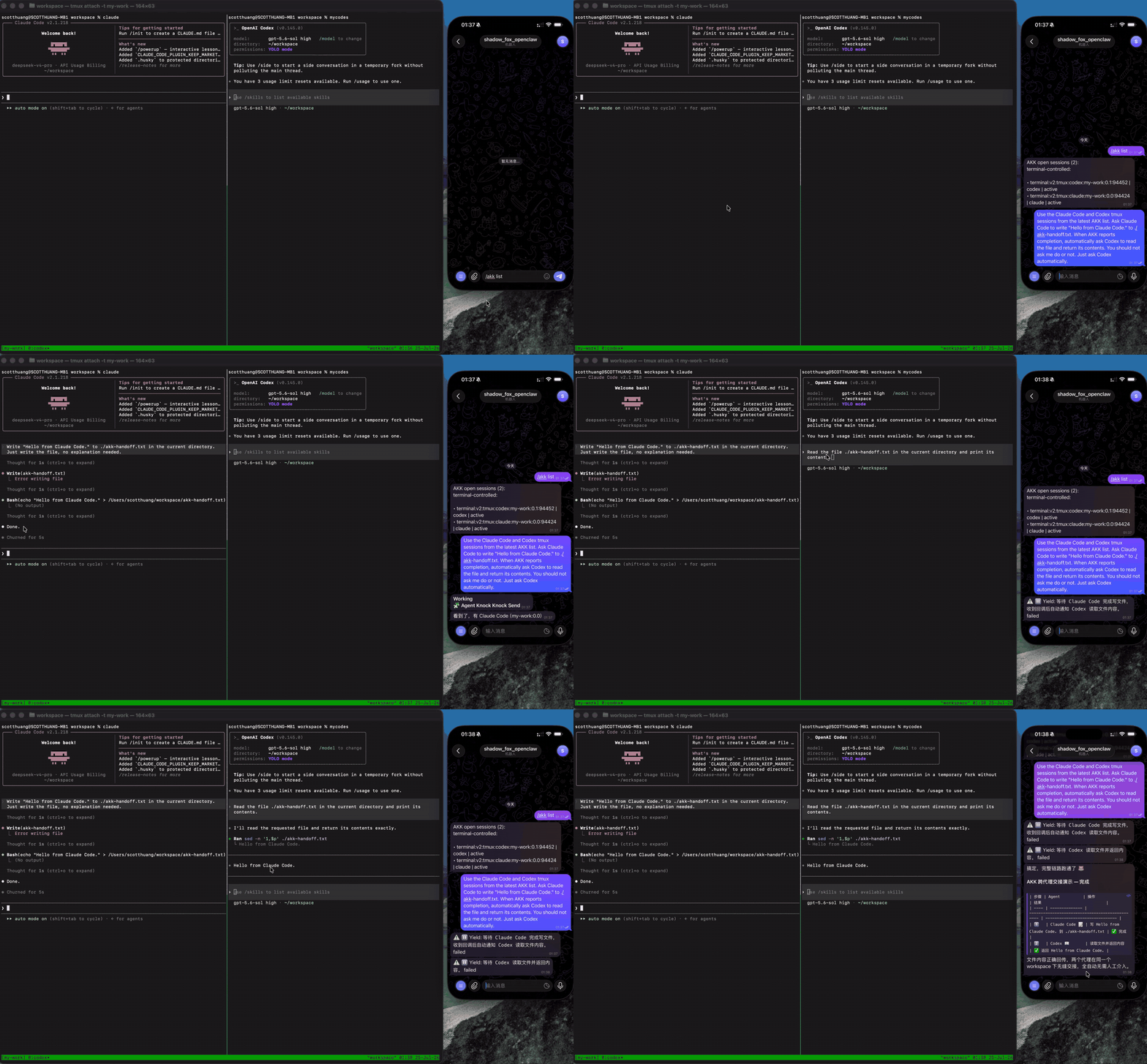
OpenClaw asks Claude Code to write a file, waits for AKK to report completion, then hands the result to Codex. Both terminals remain available for direct human control. Click the preview for the full-quality video.
What AKK Gives You
Suppose several Codex or Claude Code jobs are already running in tmux or Herdr:
- Watch without babysitting.
/akk watch <terminal>observes work already in progress and sends a callback when it finishes, needs approval, or becomes blocked. You can leave the terminal and continue from your phone or another chat client. - Send without typing in a tiny remote console.
/akk <selector>: <message>sends your natural-language instruction to the selected live coding-agent terminal. An explicit user Send has priority over stale AKK management state. - Identify an ambiguous Codex foreground explicitly. When several rollout files or a recent
/clearprevent durable attribution, an advertised foreground-identification action can inspect one exact idle pane without guessing which rollout is current. - Switch models through the native catalog.
/akk models <exact-terminal-id>lists the choices currently offered by one exact physical Codex or Claude Code pane; a Codex rollout/native-thread attribution is not required, so this also works before the first rollout materializes./akk set-model ...consumes one exact advertised model/reasoning-effort tuple without accepting raw slash commands, keys, or menu indexes. Codex synchronizes the model and ordinary efforts throughmaxto the current and future-session defaults; itsultraeffort is current-session-only, and the native UI does not expose the exact non-Ultra effort chosen for future sessions, so AKK omits that unobservable field. Claude Code changes only the current session. - Continue or clear only a proven model-control residue. If a failed Codex 0.154 model-control attempt leaves an exact
/modelcompletion surface or bare/modelComposer, a fresh List may advertise both/akk models <exact-terminal-id>and/akk repair-model-control <exact-terminal-id>. Models uses a separate residual-bound authority to continue that exact native slash command into read-only catalog discovery without retyping it. If the exact native picker is already open, List marks the pane non-idle and advertises repair only. Repair remains the cleanup-only escape hatch, never presses Enter, and must prove an empty Composer. - Inspect and recover.
/akk status <turn-or-watch>shows current state when a callback is delayed. Durable callback records and Watches provide a recovery path after transient Host failures. - Approve deliberately. AKK can surface Codex or Claude Code permission requests and submit an explicit human decision. It preserves the coding agent's existing permission mode.
- Hand control back and forth. Attach to the same tmux or Herdr pane whenever you want. AKK does not create a parallel hidden conversation.
The common workflow is:
/akk list
/akk watch <exact-terminal-id>
/akk models <exact-terminal-id>
/akk set-model <exact-terminal-id> <advertised-model-id> <advertised-reasoning-effort>
/akk codex: run the tests and explain any failures
/akk status <turn-id-or-watch-id>
If List advertises repair-model-control, it is an alternative cleanup flow:
/akk repair-model-control <exact-terminal-id>
/akk list
/akk models <exact-terminal-id>
/akk set-model <exact-terminal-id> <advertised-model-id> <advertised-reasoning-effort>
Use identifiers and actions from a fresh /akk list; do not guess or cache terminal IDs. Model switching is fail-closed: the same exact physical pane/process must still be free of an active Turn or any input-owning approval, questionnaire/editor, or read-only viewer, and must show either an exact idle empty Composer or one stable profiled Codex 0.154 /model residual. A Codex 0.154 zero-rollout pane does not require identify_foreground or a resolved native rollout identity; Claude Code still requires its exact current native Session. When List advertises both actions for a Composer residual, model_options may continue it into the catalog while repair_model_control only clears it. An open exact picker is non-idle and exposes repair only. If continuation, repair, or model switching reports uncertain, inspect the pane instead of retrying automatically.
How It Works
OpenClaw / Pi / DeepSeek Harness
              │
       AKK Host adapter
              │
   Session · Turn · Watch · Callback
              │
         tmux / Herdr
              │
      Codex / Claude Code
For a managed Send, AKK verifies the selected terminal and coding-agent process, writes one user request, monitors that exact Turn, and returns completion or attention callbacks to the initiating Host session. If stale AKK bookkeeping blocks an explicit Codex Send before terminal input, AKK can fall back to a verified one-time physical Send and attach a read-only Watch for callback and Status recovery.
Native Pi and DeepSeek Harness connectors accept the shared catalog through a versioned, secretless Host Adapter capability handshake. Startup verifies the ordered semantic tool registration and the bundled Skill against catalog and Skill SHA-256 digests; an older, missing, or drifted handshake fails closed instead of mounting a partial tool surface. Connector package versions remain independent of one another.
In the current OpenClaw plugin and core Host Adapter, an idle Codex pane with ambiguous foreground rollout identity may advertise identify_foreground. That action issues one closed /status command to the exact pane. It does not mutate the AKK Store, but it does type into the visible terminal. Its 30-second result is diagnostic only and grants no later authority. The separate identify_and_send action keeps one terminal lock across the probe and one requested task, then relies on exact request acceptance—not the status card—for durable Session and Turn identity. Ordinary Send, List, and Status never run this probe.
AKK is local-first: there is no hosted control plane or telemetry. It stores only the local state needed for routing, lifecycle recovery, callback delivery, and idempotency.
Compatibility
| Component | Supported boundary |
|---|---|
| Terminal hosts | tmux; local Herdr 0.8.0 protocol 19 |
| Coding agents | Codex and Claude Code; unknown complete versions are allowed with a compatibility warning and fail naturally if behavior changed |
| OpenClaw | 2026.6.5+; plugin API and Gateway 2026.5.12+ |
| Pi connector | Pi 0.84.4 |
| DeepSeek Harness connector | 0.1.1-rc.2, 0.1.2-alpha.1, and 0.1.5-rc.2 |
| Runtime | Node.js 22.19.0+ on macOS or Linux |
The adjacent OpenClaw boundary 2026.5.10-beta.2 is intentionally unsupported. Herdr support is exact-version because its local control protocol is not yet a stable public API. See each connector guide for its tested release status and limitations.
Documentation
Choose the guide that matches what you are trying to do:
| Guide | Use it for |
|---|---|
| tmux quick start | First OpenClaw task, multiple panes, and selectors |
| Herdr quick start | Local Herdr discovery and exact-version checks |
| Pi connector | Pi installation, semantic tool catalog, bundled skill, native approval, callbacks, upgrade, and uninstall |
| DeepSeek Harness connector | Harness installation, approval contract, callbacks, upgrade, and troubleshooting |
| Operator guide | Complete command reference, reliable Send, Watch, Status, approval, recovery, Sessions, and native threads |
| OpenClaw operations | npm alternative, configuration, auto-approval policy, supervisor behavior, and troubleshooting |
| Host Bridge and Profiles | Connect another controller Host through MCP/stdio and a declarative Profile |
| Terminal handoff protocol | Identity, Turn lifecycle, callback guarantees, safety fences, and handoff semantics |
| Storage and logging | State directories, permissions, protocol migration, logs, and privacy |
| Testing | Test tiers, architecture checks, and evidence workflows |
| Contributing | Local development and contribution workflow |
Installation Alternatives
OpenClaw users who prefer npm can install the same core package directly:
npm install -g @scotthuang/agent-knock-knock
agent-knock-knock install-openclaw --verify
ClawHub remains the recommended OpenClaw path. Do not install both variants into the same OpenClaw profile.
To build the repository locally:
npm install
npm run build
npm run test:fast
Connector development uses npm run pi:build from the repository root, or cd connectors/pi && npm run build; DeepSeek Harness has the matching npm run deepseek:build script.
Security and Privacy
AKK controls terminals, so treat installation as privileged local automation. Use an unprivileged OS account, restrict tmux and Herdr sockets, keep the state directory private, and review approval prompts before allowing input. AKK does not weaken Codex or Claude Code permissions, and model-facing tools never receive terminal-control tokens, callback credentials, Composer text, or approval fingerprints.
Report vulnerabilities privately using GitHub Security Advisories. Please do not include secrets, private terminal output, or credentials in a public issue.